Loading
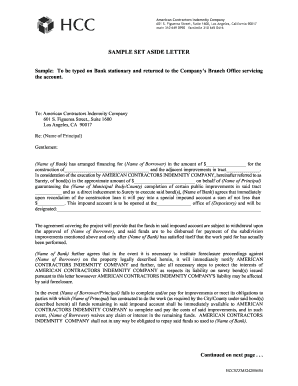
Get Set Aside Letter
How it works
-

Open form follow the instructions
-

Easily sign the form with your finger
-

Send filled & signed form or save
How to fill out the Set Aside Letter online
Filling out a set aside letter is an essential part of securing financing for construction projects. This guide will provide you with step-by-step instructions on how to complete the Set Aside Letter online efficiently and accurately.
Follow the steps to complete the Set Aside Letter online.
- Click the 'Get Form' button to obtain the Set Aside Letter form and open it in your preferred online editor.
- Begin filling out the recipient section by entering the name of the bank in the designated area where it states '(Name of Bank)'. Ensure that you use the correct legal name of the bank to avoid any delays.
- Proceed to the line labeled 'Re: (Name of Principal)', and input the name of the principal who is the borrower of the financing, ensuring clarity in the identification of the party.
- In the financing section, where it states 'in the amount of $________________', enter the total loan amount arranged by the bank for the construction project.
- Next, complete the description of the construction project in the field provided, starting from 'the construction of'. Clearly detail the scope of the project to inform the surety of what the funds will be used for.
- Fill out the adjacent improvements section by completing the designated track number. This is crucial to ensure proper documentation of the project site.
- In the next fields, continue to fill in the amount of the bonds, the name of the municipal body or county that will oversee the improvements, and ensure that all details related to the impound account are accurately filled.
- Sign the document in the space provided for your position at the bank. Include your typed name and title to authenticate the agreement.
- Ensure that all parties involved, including the surety and the person borrowing, sign the letter with their typed names and titles as required in the respective sections.
- Once you have completed all sections and verified for accuracy, save your changes, and consider downloading, printing, or sharing the completed Set Aside Letter as necessary.
Complete your Set Aside Letter online today to ensure your construction financing is secured properly.
Surveillance personnel inspects the ammunition and creates DA Form 3151-R. SAAS Operator generates an automated DA FOrm 3151-R. Customer Service Clerk creates reports for amnesty ammunition the ASP receives.