Loading
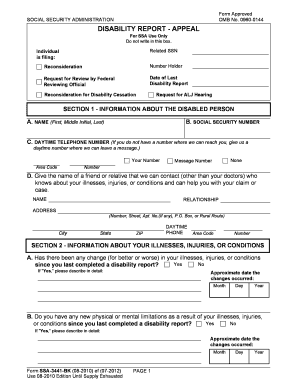
Get Disability Report - Appeal - Cooke & Company
This website is not affiliated with any governmental entity
How it works
-

Open form follow the instructions
-

Easily sign the form with your finger
-

Send filled & signed form or save
How to fill out the DISABILITY REPORT - APPEAL - Cooke & Company online
This guide provides a clear, step-by-step approach to completing the DISABILITY REPORT - APPEAL - Cooke & Company form online. By following these instructions, you can ensure that your report is filled out accurately and thoroughly, helping you to present your case effectively.
Follow the steps to fill out the DISABILITY REPORT - APPEAL efficiently.
- Use the ‘Get Form’ button to access the DISABILITY REPORT - APPEAL form and open it in your preferred digital format.
- In Section 1, provide comprehensive information about the disabled person, including their full name, social security number, and contact information. Make sure to include a reliable daytime telephone number.
- Identify a friend or relative who can assist with their case in the given fields under Section 1. Include their name, relationship, address, and daytime phone number.
- In Section 2, answer questions about any changes to illnesses, injuries, or conditions. Indicate if there have been changes since the last report, and provide details where applicable, including approximate dates of these changes.
- Also in Section 2, note any new physical or mental limitations due to the above conditions. If applicable, provide descriptions and corresponding dates.
- Continue Section 3 by detailing interactions with medical professionals. Indicate if there have been any visits to doctors, hospitals, or therapists since the last report. Include names, dates, and types of visits.
- List medications being taken in Section 4. Provide names of medications, reasons for their use, and any side effects experienced.
- In Section 5, note any medical tests that have occurred since the last report and provide details including dates, types of tests, and testing locations.
- Update work information in Section 6. If applicable, indicate whether any work was done since the last report and prepare to give further details on a separate form.
- In Section 7, explain how conditions affect daily personal needs and any changes in daily activities.
- Address educational/training information in Section 8. If any vocational or trade training has been completed since the last report, describe it fully.
- Report on any support services in Section 9, including names of organizations and counselors involved in rehabilitation or education efforts.
- Finally, use Section 10 for any additional remarks or information that was not addressed earlier. Ensure that all fields are filled as necessary.
- When all sections are completed, review the form for accuracy before saving, downloading, printing, or sharing your completed document.
Complete your disability report online today to enhance your appeal process.
Request Appeal on Time. After every decision, you have only 60 days to submit your appeal in writing. ... Write an Appeals Letter. ... Get a Supportive Opinion From Your Doctor. ... Be Completely Honest. ... Consider Getting Representation.