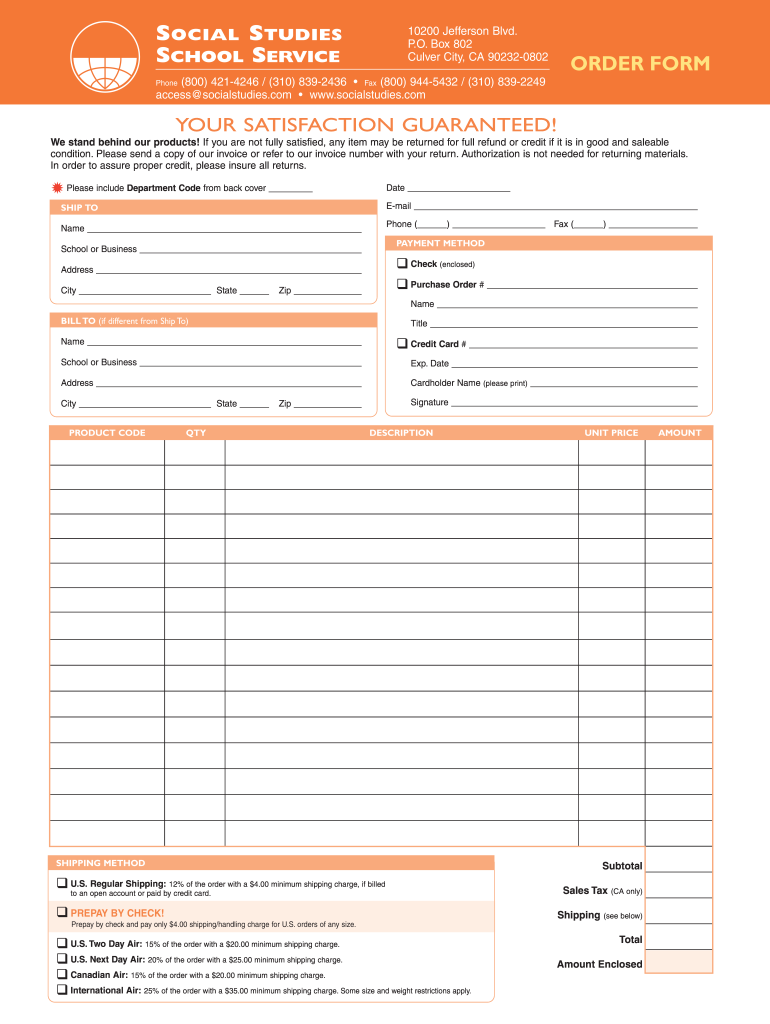
SOCIAL STUDIES SCHOOL SERVICE 10200 Jefferson Blvd. P.O. Box 802 Culver City, CA 90232-0802 ORDER FORM (800) 421-4246 / (310) 839-2436 Fax (800) 944-5432 / (310) 839-2249 access socialstudies.com.
Loading

Open form follow the instructions

Easily sign the form with your finger

Send filled & signed form or save
How to fill out the Printable Order Form - Social Studies School Service online
Filling out the Printable Order Form - Social Studies School Service is a straightforward process that simplifies the ordering of educational materials. This guide will walk you through each section of the form, ensuring you provide all necessary information accurately.
Follow the steps to complete your order form efficiently.
- Click ‘Get Form’ button to obtain the form and open it in the editor.
- Enter the date in the designated field. This helps to track your order and its processing.
- In the 'Ship To' section, fill in the recipient's email address, name, phone number, and fax number if applicable.
- Proceed to the 'Payment Method' section. Indicate if you are paying by check or purchase order, and provide the relevant information, including the name of the school or business.
- Complete the billing address in the 'Bill To' section if it differs from the shipping address. Include full details for accurate billing.
- In the 'Product Code' section, specify the product codes for the items you wish to order. Specify the quantity for each product.
- Choose a shipping method from the provided options, ensuring you understand the corresponding charges.
- Once all sections are filled out, save your changes, and proceed to download, print, or share the completed form as needed.
Start filling out your Printable Order Form online today for a seamless ordering experience.
Experience a faster way to fill out and sign forms on the web. Access the most extensive library of templates available.
Related content
1, Company, Category/Subject, Grade/Age Group, Description, Free Service Offered, Link...
Toggle Search Form ... Social Studies (Texas Essential Knowledge and Skills (TEKS):...
... JSTOR (July 2017) (Learn how and when to remove this template message). State schools...
Get answers to your most pressing questions about US Legal Forms API.
What should a statement of work include?
Common elements of an SOW include: Project objectives. Project scope. Major deliverables. Tasks that support the deliverables, and which party will complete them. Timeline for completion of work. Location of work and resources, equipment, and facilities needed. Payment costs, terms, and deadlines.
What should a statement of work look like?
The statement of work is an all-encompassing, detailed document outlining the goals, purpose, guidelines, deliverables, time requirements, costs, etc. The scope of work is one section within the SoW describing in detail the projected outcomes of the project and the specifics about the job done to hit those outcomes.
Who will prepare SOW?
Who writes the statement of work? Like most project management documents, SoWs are best written collaboratively. However, there are two main parties involved: the client or service provider and the company. SoWs need to be approved by two parties before work on your project really begins.
What is the difference between SOW and RFP?
A Scope of Work (SOW) is a fundamental piece of a Request for Proposal (RFP) and describes what the company is looking to achieve as a result of the RFP. The SOW helps ensure that the product or service meets the company's needs and establishes the parameters of what could be included in the resulting contract.
How do you write a work statement example?
How to write a statement of work Begin with an introduction. Start by writing an introduction to the project and parties. ... Determine the objectives. ... Clarify the scope. ... Break down the tasks. ... State the work location. ... Outline the work schedule. ... Explain the deliverables. ... Create payment terms.
How do you write a brief statement of work?
Here's an overview of the steps you'll need to follow to write your statement of work: Create a brief introduction for your project. Define the purpose of your project. Define your project scope. Create a work breakdown structure to identify your project tasks, milestones and deliverables.
How do you put together a statement of work?
These are the steps you can take to create a simple, but well-defined statement of work. Introduce the project. ... Define the vision. ... Set the project requirements. ... Define the scope. ... Set the deadline of the project. ... Allocate key resources. ... Create the schedule. ... Specify the terms of payment and due dates.
What should be included in a statement of work?
Elements of an SOW can include: Purpose of the project. Scope of work being performed. Location of the project, project length, and any work requirements. Expected deadlines and deliverables. Acceptance criteria. Any hardware and software required. Performance-based standards to be met.
Use professional pre-built templates to fill in and sign documents online faster. Get access to thousands of forms.
If you believe that this page should be taken down, please follow our DMCA take down process here.