Loading
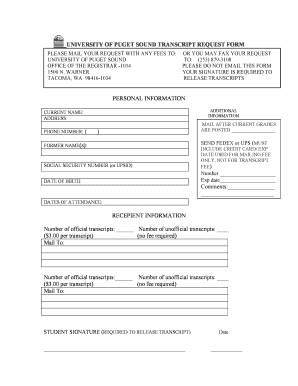
Get Transcript Request Form.pdf - University Of Puget Sound - Www2 Ups
How it works
-

Open form follow the instructions
-

Easily sign the form with your finger
-

Send filled & signed form or save
How to fill out the TRANSCRIPT REQUEST FORM.pdf - University Of Puget Sound - Www2 Ups online
This guide provides a clear and supportive approach to filling out the Transcript Request Form for the University of Puget Sound. By following these steps, users will be able to successfully complete and submit their request for transcripts.
Follow the steps to complete your transcript request form online.
- Press the ‘Get Form’ button to access the Transcript Request Form. This action will allow you to open the form in your preferred editor for completion.
- Begin by entering your current name in the designated field labeled 'Current Name'. Ensure that this matches your identification documents to avoid any issues.
- Fill in your address in the 'Address' section. Provide complete and accurate information to ensure the transcript is sent to the correct location.
- Enter your phone number, including area code, in the specified field. This will provide the university with a means of contacting you if there are any questions regarding your request.
- In the 'Social Security Number (or UPSID)' field, provide your Social Security Number or University of Puget Sound ID. This information will help identify your records.
- Complete the 'Date of Birth' section. This information is critical for verification purposes.
- If applicable, list any former names in the 'Former Name(s)' section to ensure your records can be accurately matched.
- Indicate the dates of your attendance at the university in the 'Dates of Attendance' section. This helps in locating your academic records.
- Specify the number of official and unofficial transcripts you require, along with any mailing instructions, in the 'Recipient Information' section. Remember to note any fees applicable for official transcripts.
- Provide your signature in the designated area where it states 'Student Signature (Required to Release Transcript)'. This signature authorizes the release of your transcripts.
- Include the date next to your signature to indicate when the form was completed.
- After ensuring all information is accurate and complete, save your changes. You can then download, print, or share the form as needed.
Complete your transcript request form online today for a hassle-free submission process.
An official PDF transcript will be authentic and secure for a recipient regardless of which delivery method you choose.
Industry-leading security and compliance
US Legal Forms protects your data by complying with industry-specific security standards.
-
In businnes since 199725+ years providing professional legal documents.
-
Accredited businessGuarantees that a business meets BBB accreditation standards in the US and Canada.
-
Secured by BraintreeValidated Level 1 PCI DSS compliant payment gateway that accepts most major credit and debit card brands from across the globe.