Loading
Get E4 Health Inc: New Provider Information - Imaginuity
How it works
-

Open form follow the instructions
-

Easily sign the form with your finger
-

Send filled & signed form or save
How to fill out the E4 Health Inc: New Provider Information - Imaginuity online
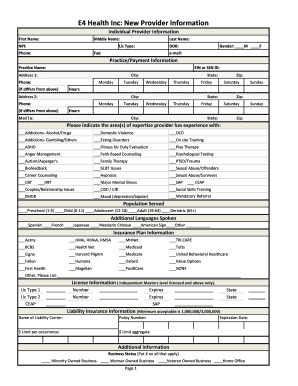
The E4 Health Inc: New Provider Information form is essential for new providers to register and provide their expertise. This guide offers a step-by-step approach to ensure that individuals can efficiently complete the form online with confidence.
Follow the steps to successfully complete the provider information form.
- Press the ‘Get Form’ button to access the document and open it in your preferred digital format.
- Begin by filling out the 'Individual Provider Information' section. Enter your first name, middle name (if applicable), last name, NPI (National Provider Identifier), license type, phone number, date of birth, fax number, email address, and select your gender.
- Next, provide your practice and payment information. Start with the practice name, then enter your EIN or SSN, address, city, state, and phone number (if different from above). Indicate the service hours for each day of the week.
- Fill out the 'Population Served' field by selecting the age groups you serve. Choose from preschool, child, adolescent, adult, or geriatric categories.
- In the 'Additional Languages Spoken' section, check all applicable languages you are proficient in.
- Provide your insurance plan information by indicating all insurance providers with which you are affiliated. If your provider is not listed, specify it in the 'Other' box.
- If applicable, complete the 'License Information' for independent masters-level licensed providers, including the license type, number, expiration date, and state.
- Enter the details regarding your liability insurance, including the name of the carrier, policy number, limit per occurrence, aggregate limit, and expiration date.
- Complete the optional, but useful, voluntary information regarding your sexual orientation, military experience, religious background, and ethnic group.
- Address the disclosure required section by answering the questions truthfully regarding any past misconduct, disciplinary actions, or malpractice history.
- Sign and date the application at the bottom to attest that the information provided is accurate and that you consent to the verification processes outlined.
- Finally, save your completed form. You may then choose to download, print, or share the form as necessary, and submit it by one of the prescribed methods.
Complete your application online today to ensure your participation in the E4 Health network.
e4 is a technology company specialising in digitalisation. By understanding the complexity of a digital journey, e4 partners with its clients to provide innovative solutions that suits their unique needs.
Industry-leading security and compliance
US Legal Forms protects your data by complying with industry-specific security standards.
-
In businnes since 199725+ years providing professional legal documents.
-
Accredited businessGuarantees that a business meets BBB accreditation standards in the US and Canada.
-
Secured by BraintreeValidated Level 1 PCI DSS compliant payment gateway that accepts most major credit and debit card brands from across the globe.