Loading
Get Tr 720b
How it works
-

Open form follow the instructions
-

Easily sign the form with your finger
-

Send filled & signed form or save
How to fill out the Tr 720b online
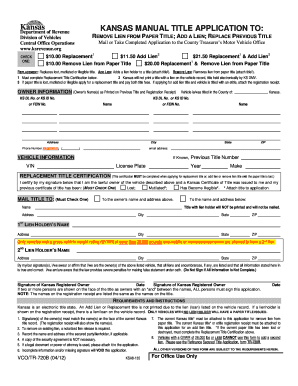
This guide provides comprehensive instructions on how to fill out the Tr 720b form online. By following these steps, you will gain clarity on the information required to successfully submit your application for a title adjustment in Kansas.
Follow the steps to complete your application with ease.
- Click the ‘Get Form’ button to access the Tr 720b form online and open it in the editor.
- Select one of the options for your application: remove lien from paper title, add a lien, or replace a previous title. Ensure you understand the implications of each option.
- Provide your owner's information, including name(s), Kansas driver's license or identification number, address, and phone number. Make sure the details match those on the previous title.
- Enter the vehicle information section accurately. Include the vehicle's VIN, make, year, license plate number, and previous title number.
- Complete the Replacement Title Certification if applying for a replacement. Indicate whether your previous title has been lost, mutilated, or has become illegible by checking the appropriate box.
- Specify where the title should be mailed by checking the appropriate box. You may choose to send it to the owner's address or a different address.
- If applicable, fill out the lienholder information, including their name and address. Remember, vehicles with a gross vehicle weight rating of more than 26,000 pounds can have a second lien.
- Review your application for completeness. Ensure that all required fields are filled and signatures are included where necessary.
- Once satisfied, save your changes, and consider downloading or printing your completed form for your records or to share it if needed.
Start filling out your Tr 720b application online today to ensure a smooth process.
Application for a certificate of title and registration must be made through the local county treasurer's office where the vehicle is garaged.