Loading
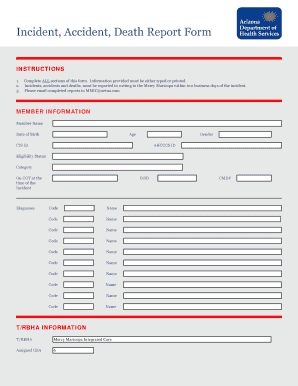
Get Incident Report Mercy Maricopa Form
How it works
-

Open form follow the instructions
-

Easily sign the form with your finger
-

Send filled & signed form or save
How to fill out the Incident Report Mercy Maricopa Form online
Filing an incident report is an important process that ensures accurate documentation and timely communication regarding incidents, accidents, or deaths. This guide will walk you through the steps needed to complete the Incident Report Mercy Maricopa Form online effectively.
Follow the steps to successfully complete the form online.
- Click ‘Get Form’ button to obtain the form and open it in the online editor.
- Fill in the member information section. Enter the member's name, date of birth, age, gender, CIS ID, AHCCCS ID, and eligibility status. Make sure all details accurately represent the individual involved.
- Provide T/RBHA information. Indicate the associated T/RBHA, which is Mercy Maricopa Integrated Care, and the assigned GSA.
- In the provider information section, include the provider's name, license number, and phone number. Complete the provider address fields, including street, city, state, and zip code, along with the date of the last visit with the clinical team and the BHMP or PCP.
- Detail the incident information. Fill in the date and time of the incident, location, and a comprehensive description of what occurred. Ensure to include the date the incident was reported to the provider.
- Indicate the type of incident by checking all that apply. Options include categories such as suicide, homicide, accidental death, and various forms of abuse. Be thorough in selecting all relevant issues.
- Document the member's condition before and after the incident, any individuals who witnessed the incident, and describe any medical services received.
- Outline actions taken and/or recommended in response to the incident, providing as much detail as needed.
- Under notifications, list all agencies informed about the incident. This may include T/RBHA, law enforcement, child protective services, and other relevant organizations.
- Complete the preparer's signature section by entering your name, credentials, and the date. Sign the form as needed.
- After completing the form, utilize the spell check feature to ensure accuracy. Then, save the form and consider emailing it to the designated recipient at MMIC@aetna.com or print a hard copy for your records.
Ensure you complete the Incident Report Mercy Maricopa Form online accurately to facilitate the necessary follow-up actions.
Industry-leading security and compliance
US Legal Forms protects your data by complying with industry-specific security standards.
-
In businnes since 199725+ years providing professional legal documents.
-
Accredited businessGuarantees that a business meets BBB accreditation standards in the US and Canada.
-
Secured by BraintreeValidated Level 1 PCI DSS compliant payment gateway that accepts most major credit and debit card brands from across the globe.