Loading
Form preview
  • US Legal Forms
  • Form Library
  • More Forms
  • More Uncategorized Forms
  • Abc Form

Get Abc Form

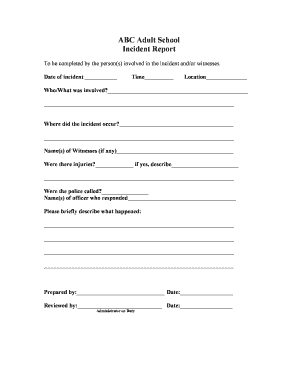
? Where did the incident occur? Name(s) of Witnesses (if any) Were there injuries? if yes, describe Were the police called?.

How it works

  1. Open form

    Open form follow the instructions

  2. Easily sign form

    Easily sign the form with your finger

  3. Share form

    Send filled & signed form or save

How to fill out the Abc Form online

Completing the Abc Form online is a straightforward process designed to facilitate incident reporting efficiently. This guide provides a step-by-step approach to ensure that users can accurately fill out every section of the form.

Follow the steps to fill out the Abc Form online:

  1. Click 'Get Form' button to access the Abc Form and open it in your browser.
  2. Enter the date of the incident in the designated field. Ensure the format is clear and accurate.
  3. Fill in the time of the incident. Provide the time in the appropriate format for clarity.
  4. Specify the location where the incident occurred. Be as precise as possible, including any relevant details.
  5. Describe who or what was involved in the incident in the provided space. Include names and any relevant information.
  6. Indicate whether there were any injuries by selecting 'Yes' or 'No'. If 'Yes', describe the injuries in the next field.
  7. State if the police were called to the scene. If so, provide the names of the officers who responded.
  8. Briefly describe what happened during the incident in the designated area. Include key facts and observations.
  9. Complete the section that requires your name and the date of preparation to finalize your report.
  10. If required, an administrator may review the form. Ensure all information is double-checked for accuracy.
  11. Once all details are filled, save your changes, download the form for your records, print it if needed, or share it with relevant parties.

Complete your Abc Form online today for a smooth reporting experience.

Get form

Experience a faster way to fill out and sign forms on the web. Access the most extensive library of templates available.
Get form

Related content

Licensing Forms | Alcoholic Beverage Control
Avoid submitting an invalid form with your application by using the most up to date...
Learn more
IRIS | Page 7: Collect Data: Direct Observations
During the video, Kathleen Lane conducts an ABC analysis, explaining each step and...
Learn more
About ABC Music Notation - Australian Traditional...
Feb 13, 2017 — ABC notation is a shorthand form of musical notation. In basic form it...
Learn more

Related links form

Affidavit Of Insurance Coverage Application For Termination For A Foreign Corporation Qualification Patents Form To Print Out From The Patent Office DEPT OF PUBLIC WORKS

Questions & Answers

Get answers to your most pressing questions about US Legal Forms API.

Contact support

Professionals in the field of ABA often refer to ABC data as the 3-term contingency. The 3 terms include the antecedent (A), the behavior (B) and the consequence (C). Each component contributes to a greater understanding of why behavior continues.

ABC Behavior Analysis: Examples Antecedent - Driver hears seat belt warning sound. Behavior - Driver puts on seat belt. Consequence - Driver avoids a possible injury and ticket.

A-B-C or ABC recording is a way of collecting information to help determine the function of a child's behaviour. It does this by breaking down your observations into three elements: Antecedents (A): what happened directly before the behaviour occurred. Behaviour (B): the specific action(s) or behaviour of interest.

Use “Antecedent-Behavior-Consequence” or an ABC chart to record behavior. This involves writing down what triggered the behavior (what happened just before the behavior occurred - known as the Antecedent), the actual Behavior, and what happened afterward as a result (the Consequence).

Use “Antecedent-Behavior-Consequence” or an ABC chart to record behavior. This involves writing down what triggered the behavior (what happened just before the behavior occurred - known as the Antecedent), the actual Behavior, and what happened afterward as a result (the Consequence).

An ABC data form is an assessment tool used to gather information that should evolve into a behavior implementation plan. ABC refers to: Antecedent- the events, action, or circumstances that occur before a behavior. Behavior- The behavior. Consequences- The action or response that follows the behavior.

ABC's of Behavior. Every instance of challenging behavior has 3 common components, an Antecedent, a Behavior, and a Consequence. These are known as the ABC's of behavior.

An ABC chart is an observational tool that allows us to record information about a particular behaviour. The aim of using an ABC chart is to better understand what the behaviour is communicating. The 'A' refers to the antecedent or the event that occurred before the behaviour was exhibited.

Get This Form Now!

Use professional pre-built templates to fill in and sign documents online faster. Get access to thousands of forms.
Get form
If you believe that this page should be taken down, please follow our DMCA take down processhere.
Get Abc Form
Get form
  • Adoption
  • Bankruptcy
  • Contractors
  • Divorce
  • Home Sales
  • Employment
  • Identity Theft
  • Incorporation
  • Landlord Tenant
  • Living Trust
  • Name Change
  • Personal Planning
  • Small Business
  • Wills & Estates
  • Packages A-Z
  • Affidavits
  • Bankruptcy
  • Bill of Sale
  • Corporate - LLC
  • Divorce
  • Employment
  • Identity Theft
  • Internet Technology
  • Landlord Tenant
  • Living Wills
  • Name Change
  • Power of Attorney
  • Real Estate
  • Small Estates
  • Wills
  • All Forms
  • Forms A-Z
  • Form Library
  • Legal Hub
  • About Us
  • Help Portal
  • Legal Resources
  • Blog
  • Affiliates
  • Contact Us
  • Delete My Account
  • Site Map
  • Industries
  • Forms in Spanish
  • Localized Forms
  • State-specific Forms
  • Forms Kit
  • Real Estate Handbook
  • All Guides
  • Notarize
  • Incorporation services
  • For Consumers
  • For Small Business
  • For Attorneys
  • USLegal
  • FormsPass
  • pdfFiller
  • signNow
  • altaFlow
  • DocHub
  • Instapage
Form Packages
  • Adoption
  • Bankruptcy
  • Contractors
  • Divorce
  • Home Sales
  • Employment
  • Identity Theft
  • Incorporation
  • Landlord Tenant
  • Living Trust
  • Name Change
  • Personal Planning
  • Small Business
  • Wills & Estates
  • Packages A-Z
Form Categories
  • Affidavits
  • Bankruptcy
  • Bill of Sale
  • Corporate - LLC
  • Divorce
  • Employment
  • Identity Theft
  • Internet Technology
  • Landlord Tenant
  • Living Wills
  • Name Change
  • Power of Attorney
  • Real Estate
  • Small Estates
  • Wills
  • All Forms
  • Forms A-Z
  • Form Library
Customer Service
  • Legal Hub
  • About Us
  • Help Portal
  • Legal Resources
  • Blog
  • Affiliates
  • Contact Us
  • Delete My Account
  • Site Map
  • Industries
  • Forms in Spanish
  • Localized Forms
  • State-specific Forms
  • Forms Kit
Legal Guides
  • Real Estate Handbook
  • All Guides
Prepared for you
  • Notarize
  • Incorporation services
Our Customers
  • For Consumers
  • For Small Business
  • For Attorneys
Our Sites
  • USLegal
  • FormsPass
  • pdfFiller
  • signNow
  • altaFlow
  • DocHub
  • Instapage
Social Media
Call us now toll free:
+1 833 426 79 33
As seen in:
© Copyright 1999-2026 airSlate Legal Forms, Inc. 3720 Flowood Dr, Flowood, Mississippi 39232
  • Your Privacy Choices
  • Terms of Service
  • Privacy Notice
  • Content Takedown Policy
  • Bug Bounty Program