Loading
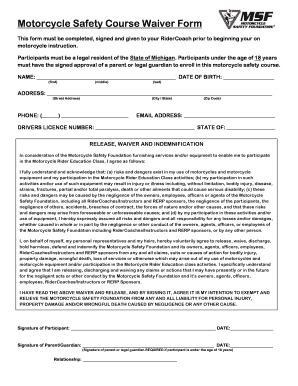
Get Motorcycle Waiver Form
How it works
-

Open form follow the instructions
-

Easily sign the form with your finger
-

Send filled & signed form or save
How to fill out the Motorcycle Waiver Form online
Completing the Motorcycle Waiver Form online is an essential step for participants in the motorcycle safety course. This guide will walk you through each section of the form, ensuring a smooth and efficient process.
Follow the steps to complete the form accurately
- Click the ‘Get Form’ button to obtain the Motorcycle Waiver Form and open it in your preferred online editor.
- Enter your name in the designated fields, using your first, middle, and last names as required.
- Input your date of birth, ensuring the format is correct. This is necessary for age verification.
- Complete the address section by providing your street address, city, state, and zip code. Make sure this information is accurately presented.
- Provide your phone number in the format specified and include your email address for any future correspondence.
- Fill in your driver's license number along with the issuing state to confirm your legal identity.
- Read the release, waiver, and indemnification section carefully. Acknowledge your understanding of the risks presented and ensure you agree to the terms outlined. This section is critical as it protects both you and the Motorcycle Safety Foundation.
- Sign the form in the designated area, including the date of your signature. If you are under 18 years of age, a parent or legal guardian must also sign the form.
- Confirm the relationship of the parent or guardian to you, which is required if you are underage.
- Upon completing the form, make sure to save any changes made. You may then download, print, or share the document as needed.
Complete your Motorcycle Waiver Form online today to ensure your participation in the motorcycle safety course!
ColorHighlighter is a plugin for the Sublime Text 2 and 3, which unobtrusively previews color values by underlaying the selected hex codes in different styles, coloring text or gutter icons. Also, plugin adds color picker, color format converter to easily modify colors.