Loading
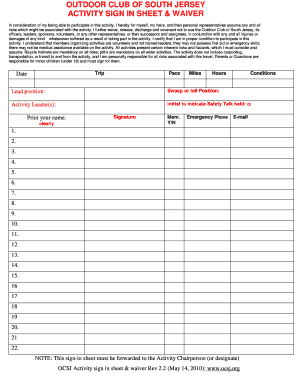
Get Plc Sign In Sheet
How it works
-

Open form follow the instructions
-

Easily sign the form with your finger
-

Send filled & signed form or save
How to fill out the Plc Sign In Sheet online
The Plc Sign In Sheet is an essential document that ensures participant safety and accountability during outdoor activities. This guide provides clear instructions on how to complete the form online effectively and accurately.
Follow the steps to fill out the Plc Sign In Sheet online.
- Press the ‘Get Form’ button to access the sign-in sheet and open it in your preferred document editor.
- Fill in the trip details, including the date, pace, miles, and hours to accurately reflect the parameters of the activity.
- Provide information about the conditions, detailing any factors that may impact the activity.
- Indicate your leadership position by selecting either 'lead position' or 'sweep or tail position' as applicable.
- Enter the names of the activity leaders to recognize those responsible for overseeing the event.
- Initial in the designated box to confirm that a safety talk was conducted prior to the activity.
- Print your name clearly in the space provided for identification purposes.
- Sign the document to acknowledge acceptance of the waiver and your commitment to participate.
- Select 'Y' or 'N' to indicate your membership status with the Outdoor Club of South Jersey.
- Provide an emergency phone number that can be contacted if needed during the activity.
- Enter your email address for communication about the activity or future events.
- Leave space for participants to sign in sequentially, ensuring all individuals are documented.
- Once all information is filled in, review the document for accuracy.
- Save your changes to the document, ensuring your inputs are retained.
- Download or print the completed form for your records or sharing with the activity chairperson.
- Share the finalized document as required, ensuring it is forwarded to the appropriate party.
Complete your sign-in sheet online to ensure a smooth and safe participation experience.
To change the default currency settings in Windows, in Control Panel, choose Clock and Region > Region > Additional Settings. On the Currency tab, in the Currency symbol box, type or select a currency symbol.
Industry-leading security and compliance
US Legal Forms protects your data by complying with industry-specific security standards.
-
In businnes since 199725+ years providing professional legal documents.
-
Accredited businessGuarantees that a business meets BBB accreditation standards in the US and Canada.
-
Secured by BraintreeValidated Level 1 PCI DSS compliant payment gateway that accepts most major credit and debit card brands from across the globe.