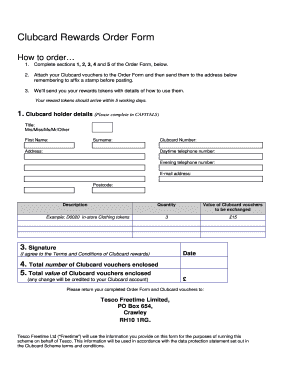
Clubcard Rewards Order Form How to order 1. Complete sections 1, 2, 3, 4 and 5 of the Order Form, below. 2. Attach your Clubcard vouchers to the Order Form and then send them to the address below.

How it works
  • Open form

    Open form follow the instructions

  • Easily sign form

    Easily sign the form with your finger

  • Share form

    Send filled & signed form or save

How to fill out the Tesco Clubcard Order Form online

Filling out the Tesco Clubcard Order Form online is a straightforward process that allows you to exchange your Clubcard vouchers for rewards. This guide will provide step-by-step instructions to ensure that you complete the form accurately and efficiently.

Follow the steps to complete the Tesco Clubcard Order Form online

  1. Click ‘Get Form’ button to obtain the form and open it in the online editor.
  2. Begin by entering your personal information in section 1. This includes your title, first name, surname, and Clubcard number. Ensure all entries are made in capital letters for clarity.
  3. Fill in your address, daytime telephone number, evening telephone number, email address, and postcode in section 2. Double-check your contact details to ensure you will receive your reward tokens without issue.
  4. In section 3, specify the details of the vouchers you are exchanging. Provide a description of the vouchers, the quantity, and the total value of the Clubcard vouchers to be exchanged.
  5. In section 4, sign the form to indicate your agreement to the terms and conditions of the Clubcard rewards. Remember to include the date of your signature.
  6. In section 5, state the total number of Clubcard vouchers you are enclosing as well as their total value. Keep in mind that any change will be credited to your Clubcard account.
  7. After completing all sections of the form, save your changes. Download or print the completed form along with any attached vouchers before submitting.
  8. Finally, send your completed Order Form and Clubcard vouchers to the specified address provided on the form. Remember to affix a stamp before posting.

Complete your Tesco Clubcard Order Form online today for a seamless rewards experience.

Get form

Experience a faster way to fill out and sign forms on the web. Access the most extensive library of templates available.

Related content

EX-99.3 5 s101770_ex99-3.htm EXHIBIT 99.3 Exhibit

Finance House: Sometimes, networks can form over simple financial incentives. ... Launched...

Learn more
Delivering Customer Value Based on Service ......

In order to attracting new customers, retaining previous customers become every ... 32%...

Learn more
Tesco - zxc.wiki

Jul 29, 2020 — legal form · Public Limited Company ... In the same year the Clubcard...

Learn more
Questions & Answers

Get answers to your most pressing questions about US Legal Forms API.

Contact support

How do I obtain a Tesco Clubcard?

You need to be 18 or over to join. You can either download the Tesco Grocery & Clubcard app from the app store, or sign up on the Clubcard website.

Registering for My Clubcard Account lets you manage your Clubcard online at your convenience. You can check the points you've collected and update your details anytime of the day.

On the web. Sign in to your 'My account' page on Tesco.com. Select 'Order a new Clubcard' on the 'My Clubcard' section. Select the 'Order a plastic Clubcard' link at the bottom of the page.

Members are only entitled to one Clubcard account each. Tesco reserves the right to refuse, merge or close additional accounts at any time.

Joining Clubcard is easy, you can register instore or online at http://.tesco.com/clubcard.

On the Tesco Grocery & Clubcard app Go to 'My Account', by selecting on the icon at the top right of your screen. Select 'Clubcard management'. Select 'Order a new Clubcard'.

Updated: 25 September 2022. To join Clubcard, you'll need to register for a Tesco account. You can register and become a Clubcard member by downloading the Tesco Grocery & Clubcard app on your smart phone from the App Store or Google Play. You can also follow the steps online at tesco.com.

Already registered for online shopping with Tesco.com? Sign in and skip to step 3. ... Complete the tesco.com registration page. Remember to fill in all the areas marked with a red asterisk. Then, fill out the registration page for My Clubcard Account. ... You're now registered with My Clubcard Account.

Visit any Tesco's and ask for a Clubcard at the customer service desk. This is usually located near one of the entrances. After filling out the form, she should receive the card by mail in a couple of days.

Here's what to do Sign in below to let us know why you need a replacement card. ( there's no need to enter the 4 digits from your card) Follow the instructions. Get your new card and key fob within 10 days. Any points and vouchers you've already collected will be transferred to your new card.

Get This Form Now!

Use professional pre-built templates to fill in and sign documents online faster. Get access to thousands of forms.

If you believe that this page should be taken down, please follow our DMCA take down process here.

Get Tesco Clubcard Order Form