Loading
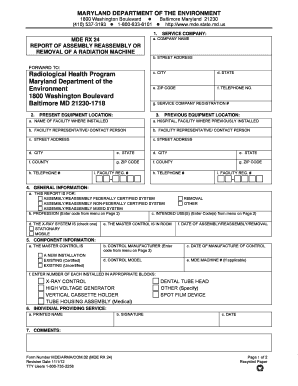
Get Service Company: Mde Rx 24 A. Company Name Report Of ... - Mde State Md
How it works
-

Open form follow the instructions
-

Easily sign the form with your finger
-

Send filled & signed form or save
How to fill out the SERVICE COMPANY: MDE RX 24 A. COMPANY NAME REPORT OF ... - Mde State Md online
Filling out the SERVICE COMPANY: MDE RX 24 A. COMPANY NAME REPORT OF ... form is a key process in ensuring compliance with health and safety regulations for radiation machines. This guide will walk you through each section of the form to help you complete it accurately and efficiently.
Follow the steps to successfully complete your form online.
- Click the ‘Get Form’ button to obtain the form and open it in your document editor.
- In the first section labeled 'SERVICE COMPANY', fill in the company name, street address, city, state, and ZIP code in the corresponding fields. Include the telephone number and the service company registration number.
- Provide the present equipment location by entering the name of the facility, facility representative or contact person's name, and their contact information, including street address, city, state, county, and ZIP code.
- For the previous equipment location, replicate the same information required in step 3 for the facility where the equipment was previously installed.
- In the general information section, select the reason for the report by checking the appropriate box (assembly, reassembly, or removal). Enter profession and intended uses based on the codes provided on page 2.
- Indicate whether the x-ray system is stationary or mobile, and specify the location of the master control room, along with the date of assembly, reassembly, or removal.
- In the component information section, indicate if the master control is a new installation or an existing system. Enter the control manufacturer and the date of manufacture of the control.
- Provide the control model and MDE machine number if applicable. Enter the number of each installed component in the designated blocks, such as x-ray control and high voltage generator.
- In the section for the individual providing service, clearly print the name, provide a signature, and date the document.
- Add any additional comments in the comments section provided.
- After completing the form, save changes, download the final document, and print or share it as necessary.
Complete your forms online efficiently by following this guide!
Industry-leading security and compliance
US Legal Forms protects your data by complying with industry-specific security standards.
-
In businnes since 199725+ years providing professional legal documents.
-
Accredited businessGuarantees that a business meets BBB accreditation standards in the US and Canada.
-
Secured by BraintreeValidated Level 1 PCI DSS compliant payment gateway that accepts most major credit and debit card brands from across the globe.