Get India3xx
How it works
-

Open form follow the instructions
-

Easily sign the form with your finger
-

Send filled & signed form or save
How to fill out the India3xx online
Filling out the India3xx entry visa application form can seem complex, but this guide will walk you through each step with clarity. By following these instructions, you will ensure a smooth application process for your entry visa to India.
Follow the steps to complete the India3xx visa application form.
- Press the ‘Get Form’ button to access the India3xx form and open it in the editor.
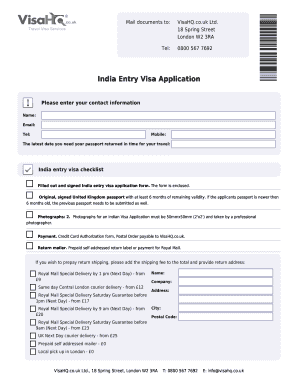
- Begin by entering your contact information, including your name, email, telephone, and mobile number. Make sure all details are accurate as they will be used for correspondence.
- Specify the latest date you need your passport returned. This is crucial for ensuring your travel plans are not disrupted.
- Prepare the India entry visa checklist. Ensure you have the filled-out and signed India entry visa application form, your original and signed UK passport with a minimum of six months validity, and two professional photographs that meet the specified requirements.
- Complete the payment section. Include a Credit Card Authorization form or a Postal Order payable to VisaHQ.co.uk to cover the visa fees.
- Make arrangements for return shipping. You will need to provide a prepaid self-addressed return label or select a mailing option based on your preference and urgency.
- Verify your proof of residency status. If you have been a resident in the UK for over two years, relevant documents should be attached. If not, ensure to complete a supplementary form as advised.
- Include an invitation letter if required. A copy from family or friends in India along with their passport and visa copies may be needed.
- Complete all other sections of the application with careful attention to detail, including personal particulars, passport details, and contact information as outlined in the form.
- After completing all fields, review the form thoroughly to ensure all information is correct. You will then have the option to save changes, download, print, or share the India3xx form.
Take the next step towards your travel plans by completing your India3xx entry visa application online.
0:05 1:27 How to Add a Line under text in Word - [ Quickly ] - YouTube YouTube Start of suggested clip End of suggested clip Like this so if you want to add a line under the title. Or into the header. What you have to do isMoreLike this so if you want to add a line under the title. Or into the header. What you have to do is click on the line you want line to appear. Then you will see here the option border and shading.