Loading
Get Tax Transcript Decoder
How it works
-

Open form follow the instructions
-

Easily sign the form with your finger
-

Send filled & signed form or save
How to fill out the Tax Transcript Decoder online
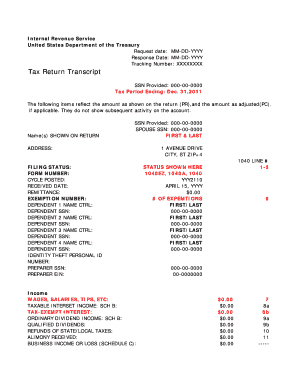
The Tax Transcript Decoder is an essential form for understanding your tax return details from the Internal Revenue Service. This guide provides clear, step-by-step instructions for filling out the form online, ensuring a smooth and informative experience.
Follow the steps to complete the Tax Transcript Decoder.
- Press the ‘Get Form’ button to access the Tax Transcript Decoder form and open it in your editing interface.
- Begin by entering the request date and response date in the provided MM-DD-YYYY format.
- Fill in the tracking number to help track your request.
- Enter the Social Security Number (SSN) that you provided, ensuring accuracy to avoid issues.
- Indicate the tax period ending date, ensuring it matches the period for which you are requesting the transcript.
- Complete the section with names shown on the return, including all individuals who filed the tax return.
- Input the address where the tax return was filed.
- Specify your filing status, whether you filed as single, married, or head of household.
- Record additional details such as form number, cycle posted, received date, remittance, and exemption number.
- List dependents' information if applicable, including names and SSNs.
- Fill out income details from various sources outlined on the form, including wages, interest, dividends, and any business income or losses.
- Complete the 'Adjustments to Income' section, listing any applicable deductions and adjustments.
- Fill the 'Tax and Credits' section accurately with your taxable income and details relevant to any tax credits you might be eligible for.
- Input information on payments, including withholding and estimated payments made throughout the year.
- Review the refund or amount owed section to ensure you've captured any refunds or balances due.
- If applicable, fill in the third-party designee section.
- Ensure to populate all sections relevant to deductions and non-itemized income accurately.
- Once all relevant fields are completed, save your changes or download the document for your records. You can also print or share it as required.
Complete your Tax Transcript Decoder online easily to ensure a thorough understanding of your tax situations.
Tax Account Transcript - shows basic data such as return type, marital status, adjusted gross income, taxable income and all payment types. It also shows changes made after you filed your original return.