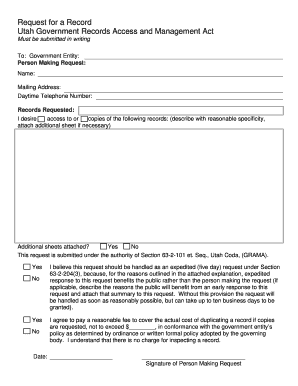
: Daytime Telephone Number: Records Requested: copies of the following records: (describe with reasonable specificity, I desire access to or attach additional sheet if necessary) Additional sheets attached? Yes No This request is submitted under the authority of Section 63-2-101 et. Seq., Utah Coda, (GRAMA). Yes No Yes No I believe this request should be handled as an expedited (five day) request under Section 63-2-204(3), because, for the reasons outlined in the attached explanation, expedit.
Open form follow the instructions
Easily sign the form with your finger
Send filled & signed form or save
How to fill out the Summit County Grama Request Form online
Filling out the Summit County Grama Request Form online is an essential process for requesting access to public records. This guide provides a detailed, step-by-step approach to ensure you complete the form accurately and effectively.
Follow the steps to successfully complete your request form
- Click the ‘Get Form’ button to obtain the form and open it in your preferred editing tool.
- Begin by filling out the section for 'Government Entity' at the top of the form. Enter the name of the specific government entity from which you are requesting records.
- Next, provide your details in the 'Person Making Request' section. Enter your name, mailing address, and daytime telephone number to ensure the entity can contact you regarding your request.
- In the section labeled 'Records Requested', clearly describe the specific records you wish to access. Be as detailed and precise as possible to assist in processing your request.
- Indicate whether you are attaching additional sheets to further specify your request. Check 'Yes' or 'No' as applicable.
- Confirm your request is submitted under the authority of the Utah Government Records Access and Management Act by checking 'Yes' or 'No' in the provided box.
- If expedited processing is required, indicate so by checking 'Yes' and provide a brief explanation of why this would benefit the public. If not needed, simply check 'No'.
- Agree to pay the necessary fees by filling in the amount you are willing to pay for duplicating the records if copies are requested. Leave it blank if no copies are needed.
- Finally, enter the date of your request and add your signature in the designated area to validate the submission.
- Once you have completed the form, you can save your changes, download, print, or share the form as needed.
Complete your Summit County Grama Request Form online today for a smooth and efficient records request process.
Experience a faster way to fill out and sign forms on the web. Access the most extensive library of templates available.
Related content
Dec 19, 2018 — Writing: Summit County IRC – P.O. Box 128, Coalville, UT 84017. 2....
County of Salt Lake, Bureau of Land Management, Utah AGRC, Esri, HERE, Garmin,...
Doha is the capital and most populous city of the State of Qatar. It has a population of...
Get answers to your most pressing questions about US Legal Forms API.
Where is title page in Word?
0:13 1:25 How to Make a Title Page in Microsoft Word - YouTube YouTube Start of suggested clip End of suggested clip That you can you can put your information. Into so it automatically fills my name and i can removeMoreThat you can you can put your information. Into so it automatically fills my name and i can remove that if i would like. And it's also got an abstract for the document.
What is a title page?
The title page of a book, thesis or other written work is the page at or near the front which displays its title, subtitle, author, publisher, and edition, often artistically decorated.
How do I find the title page in Word?
On the Insert tab, in the Pages group, click Cover Page. Click a cover page layout from the gallery of options. After you insert a cover page, you can replace the sample text with your own text by clicking to select an area of the cover page, such as the title, and typing your text.
How do I insert a title page in Word Online?
0:36 1:59 How to Create a Cover Page in Microsoft Word 2019 | Office 365 YouTube Start of suggested clip End of suggested clip As well. So i'll click here. And let's say i'll pick this one. And then you give it a document titleMoreAs well. So i'll click here. And let's say i'll pick this one. And then you give it a document title fix the font how you want it. Add additional properties if necessary.
How do I insert a title and page number in Word?
0:31 2:06 Adding an APA running head and page numbers in Word - YouTube YouTube Start of suggested clip End of suggested clip Type running head colon your title. Press the tab key twice. And type the number 1 highlight theMoreType running head colon your title. Press the tab key twice. And type the number 1 highlight the title and page number and change it to Times New Roman font in 12-point.
How do you insert a title in Word?
Double-click the header or footer . Select Document Info, and choose the information you want. Note: Select Document Property to select additional information, such as Title, Company, or Subject. Select Close Header and Footer or press Esc to exit.
How do I insert the first page in Word?
0:26 0:47 How to Insert a Blank Page in Word - YouTube YouTube Start of suggested clip End of suggested clip So all you have to do is select the insert tab. And then go to whatever page you want to create aMoreSo all you have to do is select the insert tab. And then go to whatever page you want to create a page break in between.
Use professional pre-built templates to fill in and sign documents online faster. Get access to thousands of forms.
If you believe that this page should be taken down, please follow our DMCA take down process here.