Loading
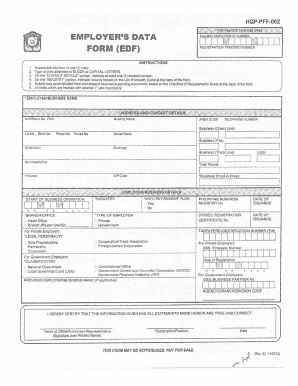
Get Hdmf Edf
How it works
-

Open form follow the instructions
-

Easily sign the form with your finger
-

Send filled & signed form or save
How to fill out the Hdmf Edf online
Filling out the Hdmf Edf online is a straightforward process that enables employers to provide essential information for registration. This guide aims to assist you in completing the form accurately and efficiently, ensuring all necessary details are included.
Follow the steps to complete the Hdmf Edf online.
- Click the ‘Get Form’ button to obtain the Hdmf Edf and open it in your preferred editor.
- Fill in the employer/business name section in capital letters. Ensure to include the full name of the business as registered.
- Provide your contact details, ensuring at least one contact number is included. Use a reliable telephone or mobile number for correspondence.
- Select the industry type from the provided list of industries found at the back of the form. This is a mandatory field.
- Complete the address section with your business's full address, including street name, barangay, municipality/city, province, and ZIP code. Make sure all entries are legible and accurate.
- Indicate if your business has a retirement plan by selecting ‘Yes’ or ‘No.’ This information is crucial for compliance and benefits processing.
- Enter the registration details, including DTI or SEC registration certificate number and date of issuance, as applicable.
- Provide the taxpayer’s identification number (TIN) in the designated field for proper business categorization and tax purposes.
- Include your email address for communication regarding the registration process and updates.
- After filling out all sections, review the information for accuracy. Ensure that all mandatory fields marked with an asterisk are completed.
- Once all information is verified, save changes, download, print, or share the completed form as required.
Complete your Hdmf Edf online today and ensure your registration is processed without delay.
Log on to www.pagibigfund.gov.ph. ... Download and accomplish the eSRS Employer Enrollment Form. ... Print and sign the Enrollment Form and submit this to the Pag-IBIG branch office maintaining your account. Pag-IBIG will notifythe employer via email as to the status of his enrollment.