Loading
Get Credit Card Enrollment (pdf) - Procare Software
How it works
-

Open form follow the instructions
-

Easily sign the form with your finger
-

Send filled & signed form or save
How to fill out the Credit Card Enrollment (pdf) - ProCare Software online
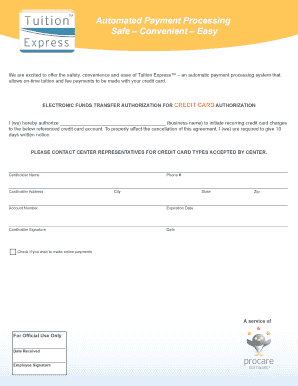
This guide provides a straightforward approach to completing the Credit Card Enrollment form for ProCare Software. Follow these steps to ensure successfully enrolling in the automated payment processing system.
Follow the steps to complete your enrollment form online.
- Click ‘Get Form’ button to obtain the Credit Card Enrollment form and open it in your preferred editor.
- In the first section, you will need to authorize the business to initiate recurring charges. Fill in the business name in the designated space to indicate who will be processing the payments.
- Next, provide the Cardholder Name along with your Phone number. Ensure that the information is accurate to allow for proper identification.
- Fill in the Cardholder Address, including the City, State, and Zip code. This information should match the billing details for the credit card being enrolled.
- Enter the Account Number and Expiration Date associated with the credit card. Ensure that these details are entered correctly to avoid processing errors.
- The Cardholder Signature section requires your signature to authorize the payments. Don’t forget to write the Date next to your signature to indicate the agreement’s effective date.
- Optionally, check the box if you wish to make online payments. This indicates your preference for processing payments electronically.
- Finally, review all entries for accuracy and completeness. Once verified, you can save changes, download a copy, print the completed form, or share it as needed.
Complete your enrollment form online today to enjoy the convenience of automated payment processing.
Click the Recurring Payments Request icon. On the Recurring Payments Request screen, choose whether to send the authorization form via Cell Phone or Email, then click Send. Important: The form link will expire after 24 hours, and a new request must be sent.
Industry-leading security and compliance
US Legal Forms protects your data by complying with industry-specific security standards.
-
In businnes since 199725+ years providing professional legal documents.
-
Accredited businessGuarantees that a business meets BBB accreditation standards in the US and Canada.
-
Secured by BraintreeValidated Level 1 PCI DSS compliant payment gateway that accepts most major credit and debit card brands from across the globe.