Loading
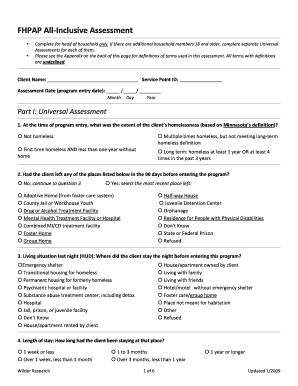
Get Fhpap All-inclusive Assessment Form - Homebase
How it works
-

Open form follow the instructions
-

Easily sign the form with your finger
-

Send filled & signed form or save
How to fill out the FHPAP All-Inclusive Assessment Form - HomeBase online
Completing the FHPAP All-Inclusive Assessment Form online is an essential step for individuals seeking assistance. This guide provides clear and detailed instructions to help you navigate and complete the form with confidence.
Follow the steps to successfully fill out the FHPAP All-Inclusive Assessment Form online.
- Click ‘Get Form’ button to access the FHPAP All-Inclusive Assessment Form and open it in your preferred online editor.
- Begin by filling in the client's name, service point ID, and assessment date. Ensure these fields are completed accurately.
- In Part I: Universal Assessment, answer question 1 regarding the extent of homelessness according to Minnesota's definition. Select the appropriate option based on the client's situation.
- For question 2, indicate whether the client left any listed places in the 90 days prior to entering the program, and select the most recent location if applicable.
- Question 3 requires you to note the living situation of the client on the night before entering the program. Carefully choose one option from the list provided.
- In question 4, specify the length of stay at the previous living situation by selecting the appropriate duration.
- Question 5 asks about the duration since the client last had a permanent address. Choose the relevant time frame for the client.
- Record the client's last permanent address in question 6. Include the state, county (if applicable), and city.
- Move to the income section and accurately record the client's income details in the grid provided in question 7, ensuring each adult's income is entered on their individual record.
- Continue by marking the disabilities present in question 8, if any. You will also need to address whether the client has a long-term disability in question 9.
- In question 10, indicate if the client has served in the U.S. Armed Forces. Provide accurate information based on the client's history.
- Proceed to Part II: FHPAP Assessment, where you will need to fill in the city and county where the client resides while receiving FHPAP assistance.
- Complete the FHPAP program goal selection in question 13 if the program is in Hennepin or Ramsey County.
- In Part III: Barriers to Housing Stability Assessment, follow the provided questions to assess barriers, noting any tenant screening or income barriers faced by the household.
- When finished, review all provided information for accuracy. Users can save changes, download, print, or share the form as necessary.
Ensure your application is complete by filling out the FHPAP All-Inclusive Assessment Form online today.
Other Ways to Search for Services and Housing 211 First Call for Help - Minnesota Information and referral Hotline. HousingLink - Affordable Rental Housing Information. Minnesota Help - A searchable database of Minnesota Social Service Providers.
Industry-leading security and compliance
US Legal Forms protects your data by complying with industry-specific security standards.
-
In businnes since 199725+ years providing professional legal documents.
-
Accredited businessGuarantees that a business meets BBB accreditation standards in the US and Canada.
-
Secured by BraintreeValidated Level 1 PCI DSS compliant payment gateway that accepts most major credit and debit card brands from across the globe.