Loading
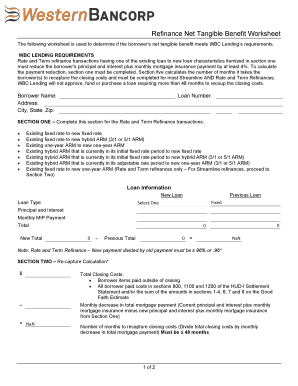
Get Net Tangible Benefit Worksheet
How it works
-

Open form follow the instructions
-

Easily sign the form with your finger
-

Send filled & signed form or save
How to fill out the Net Tangible Benefit Worksheet online
Filling out the Net Tangible Benefit Worksheet is an essential step for borrowers looking to evaluate their refinancing options. This guide provides a detailed, step-by-step approach to help users complete the form efficiently and accurately.
Follow the steps to complete the worksheet online effectively.
- Click the ‘Get Form’ button to access the worksheet and open it for editing.
- Begin by entering the borrower's name, address, and loan number in the designated fields.
- In Section One, determine and select the existing loan type and its characteristics compared to the new loan. This section is crucial for Rate and Term Refinance transactions.
- Provide the loan information, including the principal and interest of both the new and previous loans. Ensure the payments are accurately entered to facilitate the calculation.
- After entering the values, use the indicated formula to determine if the new total payment is less than or equal to 96% of the previous total payment.
- Proceed to Section Two for the recapture calculation. First, input the total closing costs, followed by calculating the monthly decrease in the total mortgage payment.
- Divide the total closing costs by the monthly decrease to find the number of months required to recapture closing costs. Confirm that this value is less than or equal to 48 months.
- Once all sections are completed, review the information for accuracy. You can then save your changes, download the form, print it, or share it as needed.
Complete your Net Tangible Benefit Worksheet online today to ensure an informed refinancing decision.
A state specific NTB test will be required in CO*, MA, MD, ME, RI, SC, VA and WV.