Loading
Get Medical Profile
How it works
-

Open form follow the instructions
-

Easily sign the form with your finger
-

Send filled & signed form or save
How to fill out the Medical Profile online
Filling out your Medical Profile online is a straightforward process that requires attention to detail. This guide will walk you through each section of the form, ensuring you provide accurate and complete information.
Follow the steps to complete your Medical Profile accurately and efficiently.
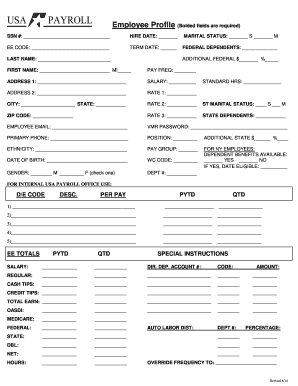
- Click the ‘Get Form’ button to obtain the form and open it in your designated editor.
- Begin by entering your Social Security Number in the designated field. This information is essential for identity verification.
- Fill in your hire date. Accurate dating is crucial for maintaining your employment records.
- Indicate your marital status by selecting either single or married in the respective field.
- Input your employee code in the corresponding field to link your profile to the company records.
- Complete the term date if applicable, or leave it blank if you are currently employed.
- List the number of federal dependents if any. Ensure that this information reflects your current tax situation.
- Provide your last name and first name, including your middle initial in the specified fields.
- Select your pay frequency, which outlines when you receive payments.
- Fill in your address details, both primary and any additional address if applicable.
- Enter your salary in the provided field to denote your compensation.
- List your city, state, and zip code in the relevant places.
- Include the additional federal withholding amounts and percentages if applicable.
- For state-specific information, such as state dependents, provide the required details.
- Input your employee email address for communications related to your profile.
- Create a VMR password for accessing your profile securely.
- Provide your primary phone number for contact purposes.
- Indicate your position within the organization.
- List any additional state withholding amounts and percentages as needed.
- Input your ethnicity for demographic purposes.
- Select your pay group in the provided field.
- Enter your date of birth for identification.
- Complete the WC code if applicable, which relates to workers' compensation.
- If applicable, for New York employees, indicate if dependent benefits are available and, if so, the date eligible.
- Select your gender in the designated field.
- Fill in your department number and standard hours worked.
- If there are specific payroll office use codes, provide those in the relevant sections.
- Complete any additional instructions or information as needed.
- Once all fields are filled, you can save the changes, download, print, or share the completed form as required.
Complete your Medical Profile online today to ensure your information is up to date.
The Medication Profile provides a view only report of a patient's drug summary, or a detailed listing of medications for a specified number of months. It includes: a list of prescriptions, dispenses, and other Medications and a list of known allergies and intolerances. Note.