Loading
Form preview
  • US Legal Forms
  • Other Templates
  • More Forms
  • More Uncategorized Forms
  • Mycarolinas Login

Get Mycarolinas Login

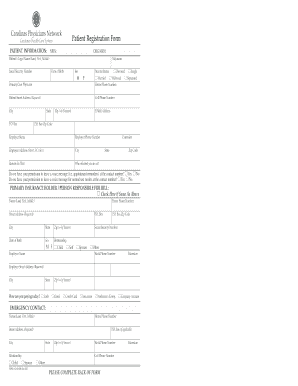
Carolinas Physicians Network PATIENT INFORMATION: MRN: PATIENT INFORMATION: Sex Marital Status M F Divorced Primary Care Physician Married Widowed Home Phone Number Patient Street Address (Required).

How it works

  1. Open form

    Open form follow the instructions

  2. Easily sign form

    Easily sign the form with your finger

  3. Share form

    Send filled & signed form or save

How to fill out the Mycarolinas Login online

This guide provides clear instructions to help users complete the Mycarolinas Login form online. Following the steps outlined below will ensure a smooth and efficient process.

Follow the steps to successfully fill out the Mycarolinas Login form.

  1. Click ‘Get Form’ button to obtain the form and open it in the editor.
  2. Begin by entering your patient information. Fill in your legal name in the format of last name, first name, and middle name. Include your social security number, nickname, date of birth, gender, and marital status.
  3. Provide your contact information. Fill out your home phone number, cell phone number, street address, city, state, and zip code. If you have a P.O. Box, include that as well.
  4. Indicate your primary care physician and the reason for your visit. Also, specify who referred you to the facility.
  5. Consent for contact: Indicate if you allow voice messages for appointment reminders and normal test results at the contact number by selecting 'Yes' or 'No.'
  6. If the primary insurance holder is the same as the patient, check the appropriate box. Otherwise, fill out the insurance holder's name, contact information, and relationship to the patient.
  7. Provide details about your payment method for today’s visit, selecting from options such as cash, check, credit card, insurance, and others.
  8. Complete the emergency contact section with the contact's name, relationship, and their phone numbers.
  9. Fill out the insurance information section for both primary and secondary insurance. Include the insurance company name, member/policyholder details, and their ID numbers.
  10. Once all sections are completed, review the information for accuracy before submitting. You may choose to save changes, download, print, or share the form if needed.

Complete your Mycarolinas Login online today for a seamless experience.

Get form

Experience a faster way to fill out and sign forms on the web. Access the most extensive library of templates available.
Get form

Related content

NC's MyDMV
Login Requirements. A valid North Carolina driver license or ID (issued after January...
Learn more
Navarro College - Portal Access
Login. Set Password. Forgot Password? Lanyard. Login Using Smart Card. 3200 W 7th Ave...
Learn more
R3hab - 나무위키
"#miamibackagain" (with Nari & Milani & Mync). "Revolution" (with NERVO and Ummet Ozcan)...
Learn more

Related links form

Application For Cash Soil Erosion Application Packet - Marquette County Download Panel Participant Form - Focus Groups Cleveland E.E. Cleveland Manor 2611 Alvingroom Court Oakland

Questions & Answers

Get answers to your most pressing questions about US Legal Forms API.

Contact support

Sign in to the MyAtriumHealth website. Go to Account Settings on the main menu and click Family Access. Click on link to Request access to a minor's record to complete and submit your request for access.

Atrium is a Data Driven Team Management platform that is custom made to help AE, SDR, and CS / AM managers use data to improve team performance. With Atrium, managers have: 1. Out of box library of all the KPIs that matter 2. Proactive goal tracking 3.

You can make appointments, pay bills, refill prescriptions and send messages to your care team – all from your phone or computer.

Follow these steps to sign up for a MyAtriumHealth account. Enter your personal information. Verify your contact information. Choose a username and password.

How do I change my legal name in MyAtriumHealth? To make a request to change your legal name, email MyChartSupport@DoNotUse.DoNotUse or call our MyAtriumHealth Patient Support Line at 855-799-0044 or Email: MyAtriumHealth@atriumhealth.org.

To access the tool, go to the PeopleConnect homepage and select Network Password Help in the 'Take me to' drop-down box. From this page, you can change your current network password, reset your password using security questions, or unlock your account.

Based in Charlotte, North Carolina, Atrium Health is an integrated, nonprofit health system with more than 70,000 teammates serving patients at 40 hospitals and more than 1,400 care locations.

Get This Form Now!

Use professional pre-built templates to fill in and sign documents online faster. Get access to thousands of forms.
Get form
If you believe that this page should be taken down, please follow our DMCA take down processhere.
Get Mycarolinas Login
Get form
  • Adoption
  • Bankruptcy
  • Contractors
  • Divorce
  • Home Sales
  • Employment
  • Identity Theft
  • Incorporation
  • Landlord Tenant
  • Living Trust
  • Name Change
  • Personal Planning
  • Small Business
  • Wills & Estates
  • Packages A-Z
  • Affidavits
  • Bankruptcy
  • Bill of Sale
  • Corporate - LLC
  • Divorce
  • Employment
  • Identity Theft
  • Internet Technology
  • Landlord Tenant
  • Living Wills
  • Name Change
  • Power of Attorney
  • Real Estate
  • Small Estates
  • Wills
  • All Forms
  • Forms A-Z
  • Other Templates
  • Legal Hub
  • About Us
  • Help Portal
  • Legal Resources
  • Blog
  • Affiliates
  • Contact Us
  • Delete My Account
  • Site Map
  • Industries
  • Forms in Spanish
  • Localized Forms
  • State-specific Forms
  • Forms Kit
  • Real Estate Handbook
  • All Guides
  • Notarize
  • Incorporation services
  • For Consumers
  • For Small Business
  • For Attorneys
  • USLegal
  • FormsPass
  • pdfFiller
  • signNow
  • altaFlow
  • DocHub
  • Instapage
Form Packages
  • Adoption
  • Bankruptcy
  • Contractors
  • Divorce
  • Home Sales
  • Employment
  • Identity Theft
  • Incorporation
  • Landlord Tenant
  • Living Trust
  • Name Change
  • Personal Planning
  • Small Business
  • Wills & Estates
  • Packages A-Z
Form Categories
  • Affidavits
  • Bankruptcy
  • Bill of Sale
  • Corporate - LLC
  • Divorce
  • Employment
  • Identity Theft
  • Internet Technology
  • Landlord Tenant
  • Living Wills
  • Name Change
  • Power of Attorney
  • Real Estate
  • Small Estates
  • Wills
  • All Forms
  • Forms A-Z
  • Other Templates
Customer Service
  • Legal Hub
  • About Us
  • Help Portal
  • Legal Resources
  • Blog
  • Affiliates
  • Contact Us
  • Delete My Account
  • Site Map
  • Industries
  • Forms in Spanish
  • Localized Forms
  • State-specific Forms
  • Forms Kit
Legal Guides
  • Real Estate Handbook
  • All Guides
Prepared for you
  • Notarize
  • Incorporation services
Our Customers
  • For Consumers
  • For Small Business
  • For Attorneys
Our Sites
  • USLegal
  • FormsPass
  • pdfFiller
  • signNow
  • altaFlow
  • DocHub
  • Instapage
Social Media
Call us now toll free:
+1 833 426 79 33
As seen in:
© Copyright 1999-2026 airSlate Legal Forms, Inc. 17 Station Street, Ste. 203, Brookline, MA 02445
  • Your Privacy Choices
  • Terms of Service
  • Privacy Notice
  • Content Takedown Policy
  • Bug Bounty Program