Loading
Get Shared Teaching Form
How it works
-

Open form follow the instructions
-

Easily sign the form with your finger
-

Send filled & signed form or save
How to fill out the Shared Teaching Form online
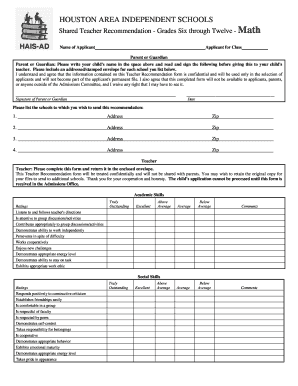
The Shared Teaching Form is an essential document designed to facilitate recommendations for students applying to grades six through twelve in mathematics. This guide provides clear, step-by-step instructions on how to complete this form online efficiently.
Follow the steps to complete the Shared Teaching Form online.
- Click ‘Get Form’ button to obtain the Shared Teaching Form and open it in the designated editor.
- Begin by entering the applicant's name in the specified space at the top of the form. Next, list the name of the parent or guardian responsible for submitting the recommendation.
- Instruct the parent or guardian to read and sign the confidentiality clause, acknowledging that the information is confidential and will not be shared outside the Admissions Committee.
- Provide the schools to which the recommendation should be sent, entering the name and address of each school in the designated fields. Include a zip code for each listing.
- As the teacher, complete the academic skills and social skills ratings sections by evaluating the applicant based on the provided descriptors, selecting the most appropriate ratings.
- Fill out the section regarding the applicant's mathematical ability, providing ratings and comments as relevant.
- Circle the adjectives that best describe the applicant from the provided list, ensuring an accurate representation.
- Briefly describe the applicant's work habits and indicate if they are habitually tardy or absent, providing explanations where applicable.
- Select the appropriate recommendation level for the applicant and provide explanations if the recommendation is 'Recommended with Reservation' or 'Not Recommended.'
- Fill in additional information regarding the applicant's family or any other comments that might assist the Admissions Committee.
- If willing, indicate a preference for discussing the applicant by telephone and provide the teacher's signature, print name, and contact information in the assigned fields.
- Save changes to the completed form, then download or print it for submission, ensuring it is returned in the provided envelope.
Complete the Shared Teaching Form online today to facilitate the admission process for students.
Open a form in Google Forms. In the top right, click More . Click Add collaborators. Under "Invite people," type the names or email addresses of the people you want to work with. Click Send.
Industry-leading security and compliance
US Legal Forms protects your data by complying with industry-specific security standards.
-
In businnes since 199725+ years providing professional legal documents.
-
Accredited businessGuarantees that a business meets BBB accreditation standards in the US and Canada.
-
Secured by BraintreeValidated Level 1 PCI DSS compliant payment gateway that accepts most major credit and debit card brands from across the globe.