Loading
Get Sap Appeal Form - Cleveland State Community College - Clevelandstatecc
How it works
-

Open form follow the instructions
-

Easily sign the form with your finger
-

Send filled & signed form or save
How to fill out the SAP Appeal Form - Cleveland State Community College - Clevelandstatecc online
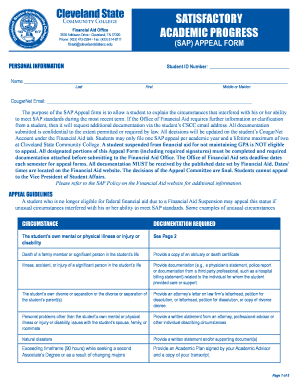
The SAP Appeal Form at Cleveland State Community College is a crucial document for students seeking to explain the circumstances that impacted their academic performance. This guide provides clear, step-by-step instructions for completing the form online to ensure users can submit their appeals effectively.
Follow the steps to fill out the SAP Appeal Form accurately.
- Click ‘Get Form’ button to obtain the form and open it in the editor.
- Fill in your personal information, including your Student ID number and full name. Ensure accuracy in your CougarNet email as this will be critical for further communication regarding your appeal.
- Select the basis of your appeal by checking the appropriate box that aligns with your circumstances, whether it’s due to your own mental or physical health, personal issues, or exceeding the timeframe for degree completion.
- If applicable, for mental or physical health issues, attach the required medical documentation and write a personal statement addressing the impact of the condition on your academic performance.
- For appeals based on circumstances other than health issues, prepare a personal statement detailing how these circumstances affected your ability to meet SAP standards and include supporting documents as specified.
- If your appeal relates to exceeding the time frame for degree completion, complete the Financial Aid Academic Plan with your advisor and provide a statement explaining your reasons for returning to school.
- Ensure all required sections are completed, and double-check for any missing documentation. Each section’s requirements vary, so refer carefully to the guidelines.
- Once you have filled out the form and attached the necessary documents, submit it to the Office of Financial Aid by the designated deadline.
- After submission, follow up through your CougarNet account as updates regarding your appeal will be communicated there.
Complete your SAP Appeal Form online today to address your financial aid situation effectively.
Meet with a financial aid advisor. Complete the Satisfactory Academic Progress Appeal form. Submit a typed request for consideration which must clearly state what caused the suspension, provide copies of supporting documentation, and must also clearly indicate what has changed. Submit a student success plan.
Industry-leading security and compliance
US Legal Forms protects your data by complying with industry-specific security standards.
-
In businnes since 199725+ years providing professional legal documents.
-
Accredited businessGuarantees that a business meets BBB accreditation standards in the US and Canada.
-
Secured by BraintreeValidated Level 1 PCI DSS compliant payment gateway that accepts most major credit and debit card brands from across the globe.