Loading
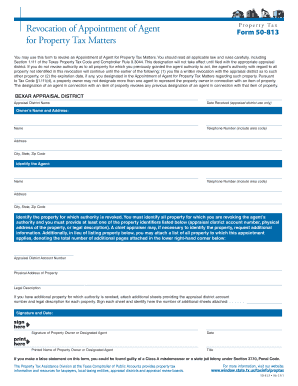
Get Revocation Of Appointment Of Agent - Bexar Appraisal District - Bcad
How it works
-

Open form follow the instructions
-

Easily sign the form with your finger
-

Send filled & signed form or save
How to fill out the Revocation Of Appointment Of Agent - Bexar Appraisal District - Bcad online
Completing the Revocation Of Appointment Of Agent form for Bexar Appraisal District is an essential step in managing your property tax matters. This guide provides easy-to-follow instructions on how to fill out the form correctly online.
Follow the steps to complete the form accurately.
- Click ‘Get Form’ button to obtain the form and open it in your online editor.
- Enter your name and address in the designated fields. Provide your telephone number, ensuring to include the area code for effective communication.
- Identify the agent you are revoking authority from by entering their name, telephone number, and address, including the area code.
- Specify the property for which the agent's authority is being revoked. You must include at least one of the following identifiers: appraisal district account number, physical address of the property, or legal description. Ensure to fill out all required fields.
- If additional properties need to be addressed, attach supplementary sheets listing each property’s appraisal district account number and legal description. Sign each sheet and denote in the provided space how many sheets are attached.
- Sign and date the form in the designated section to confirm its authenticity. Ensure to print your name and title where applicable.
- Review the completed form for any errors or omissions. Once verified, you can save the changes, download, print, or share the completed form as needed.
Take the necessary steps to manage your property tax documents online today.
Property Tax and Appraisals The Texas Tax Code, Section 33.06, allows taxpayers 65 years of age or older to defer their property taxes until their estates are settled after death.
Industry-leading security and compliance
US Legal Forms protects your data by complying with industry-specific security standards.
-
In businnes since 199725+ years providing professional legal documents.
-
Accredited businessGuarantees that a business meets BBB accreditation standards in the US and Canada.
-
Secured by BraintreeValidated Level 1 PCI DSS compliant payment gateway that accepts most major credit and debit card brands from across the globe.