Loading
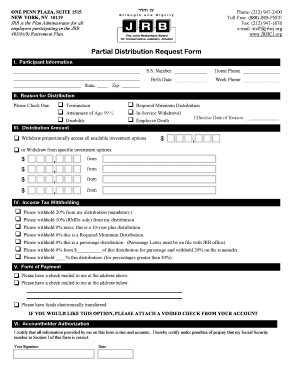
Get , , , , Partial Distribution Request Form ,
How it works
-

Open form follow the instructions
-

Easily sign the form with your finger
-

Send filled & signed form or save
How to fill out the Partial Distribution Request Form online
Filling out the Partial Distribution Request Form online is a straightforward process that allows you to request a distribution from your retirement plan. This guide provides clear steps to help you complete each section accurately and efficiently.
Follow the steps to successfully fill out your form
- Click the ‘Get Form’ button to access the Partial Distribution Request Form and open it in your preferred document editor.
- In the Participant Information section, fill in your state, Social Security number, home phone, birth date, work phone, and zip code. Ensure all information is accurate.
- In the Reason for Distribution section, check one option that corresponds to your situation, such as termination or disability. Provide the effective date of the reason in the designated field.
- For the Distribution Amount section, choose whether you want to withdraw proportionally across all available investment options or specify certain investment options. Enter the amounts accordingly.
- In the Income Tax Withholding section, select your desired withholding option. Be sure to check the appropriate box for the amount you wish to have withheld from your distribution.
- In the Form of Payment section, indicate how you prefer to receive your distribution. Choose whether you want a check mailed or an electronic transfer, and if choosing the latter, remember to attach a voided check.
- Finally, complete the Accountholder Authorization section. Provide your signature and the date to certify that all information is accurate. Ensure that all fields are filled out before saving your form.
- Once you have completed the form, you can save your changes, download a copy, print it for your records, or share it as needed.
Complete your form online today for a seamless distribution request experience.
Rollover (Code G)Distribution code G on your 1099-R indicates that your WRS benefit was rolled over to another qualified plan.
Industry-leading security and compliance
US Legal Forms protects your data by complying with industry-specific security standards.
-
In businnes since 199725+ years providing professional legal documents.
-
Accredited businessGuarantees that a business meets BBB accreditation standards in the US and Canada.
-
Secured by BraintreeValidated Level 1 PCI DSS compliant payment gateway that accepts most major credit and debit card brands from across the globe.