Loading
Get Polk County Inquiry
How it works
-

Open form follow the instructions
-

Easily sign the form with your finger
-

Send filled & signed form or save
How to fill out the Polk County Inquiry online
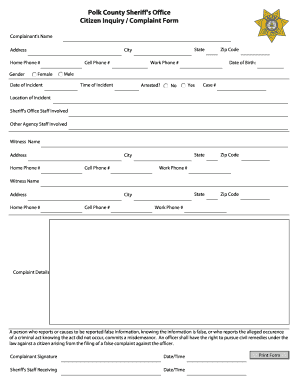
The Polk County Inquiry form is an important document for individuals wishing to report a complaint or inquiry regarding the sheriff's office. This guide will provide you with comprehensive, step-by-step instructions to ensure that you can complete the form accurately and effectively.
Follow the steps to complete the Polk County Inquiry form online.
- Click ‘Get Form’ button to acquire the form and open it in the editor, making it ready for your input.
- Begin by filling in the complainant's name and address. Ensure all provided information is accurate to facilitate communication.
- Enter your home phone number and cell phone number in the designated fields to provide multiple contact options.
- Select your gender from the options provided. Make sure to check the appropriate box.
- Fill in your city, state, and zip code. This helps to identify the jurisdiction relevant to your inquiry.
- Provide your date of birth in the specified format to establish your identity.
- Record the date and time of the incident you are inquiring about. Accurate details help to track the events.
- Indicate whether there was an arrest involved by selecting 'Yes' or 'No'. If applicable, provide the case number associated with the incident.
- Detail the location of the incident in the designated field to provide context.
- List any sheriff's office staff involved, along with details for other agency staff referenced in your report.
- Include witness details by filling in their name, address, phone numbers, and the city, state, and zip code where they reside.
- Clearly describe the details of your complaint in the designated area. Ensure you present your account without falsehood to avoid civil penalties.
- Finally, don’t forget to sign the form and provide the date and time of submission to validate your complaint.
- Check your filled form for accuracy before saving changes, downloading, printing, or sharing it as necessary.
Ensure that you complete your Polk County Inquiry form accurately online today.
Click where you want to add the footnote. Click Insert > Insert Footnote. Word inserts a reference mark in the text and adds the footnote mark at the bottom of the page. Type the footnote text.
Industry-leading security and compliance
US Legal Forms protects your data by complying with industry-specific security standards.
-
In businnes since 199725+ years providing professional legal documents.
-
Accredited businessGuarantees that a business meets BBB accreditation standards in the US and Canada.
-
Secured by BraintreeValidated Level 1 PCI DSS compliant payment gateway that accepts most major credit and debit card brands from across the globe.