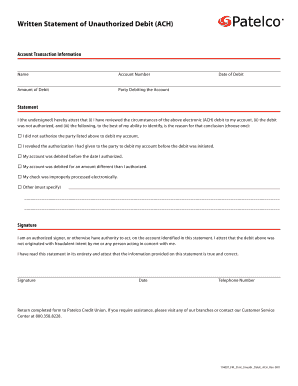
Written Statement of Unauthorized Debit (ACH) Account Transaction Information Name Account Number Amount of Debit Date of Debit Party Debiting the Account Statement I (the undersigned) hereby attest.

How it works
  • Open form

    Open form follow the instructions

  • Easily sign form

    Easily sign the form with your finger

  • Share form

    Send filled & signed form or save

How to fill out the Form -WSUD Form Digital Final - Patelco Credit Union - Patelco online

This guide provides clear and detailed instructions on how to effectively complete the WSUD Form Digital Final for Patelco Credit Union. By following the steps outlined below, you will be able to accurately report unauthorized debit transactions.

Follow the steps to complete the form correctly.

  1. Press the ‘Get Form’ button to acquire the WSUD Form Digital Final and open it in your preferred editor.
  2. Fill in your name in the designated field to identify yourself as the account holder.
  3. Enter your account number accurately to ensure correct processing of your claim.
  4. Specify the amount that was debited from your account in the relevant field.
  5. Indicate the party that debited your account, as this will help in identifying the transaction.
  6. Include the date when the debit occurred to provide a clear timeline for your statement.
  7. Review the statement section, checking the box that best describes your situation regarding the unauthorized debit.
  8. If you have selected 'Other', clearly specify the reason for the unauthorized debit in the space provided.
  9. Sign the form, affirming that you are an authorized signer on the account and that the information given is accurate and truthful.
  10. Date your signature to confirm when the form was completed.
  11. Provide a contact telephone number where you can be reached for any further information required.
  12. Once all sections are filled in, save your changes, and then you can download, print, or share the completed form as needed.

Complete your WSUD Form Digital Final online to ensure your unauthorized debit is reported and resolved quickly.

Get form

Experience a faster way to fill out and sign forms on the web. Access the most extensive library of templates available.

Related content

Credit Union and Corporate Call Report Data |...

Dec 4, 2020 — Electronic Loan, Deposit & Investment Data Collection ... Financial Trends...

Learn more
September 14, 2020 | CampusMemo

Sep 14, 2020 · Constitution Day goes digital Sept. 17 ... Look for the DocuSign icon next...

Learn more
Organizations - The Collective Intelligence Design...

Today, one out of 10 digital banking customers in America is using Q2's single ... They...

Learn more
Questions & Answers

Get answers to your most pressing questions about US Legal Forms API.

Contact support

How do I transfer money from the same bank?

Since transfers within the same bank don't require any external resources, they're usually free and quick....Ways to make transfers within the same bank: Check. Mobile banking app. ATM to your own linked account. Third-party mobile payment. Bank or wire transfer in person, by phone or online.

Open the Patelco Mobile App. Select MORE (or the three lines) then select Send Money with Zelle ® Select Send. Add a trusted person to How to send money with Zelle® Enter the amount and select your funding account. Review and include a message if you like, then tap Send.

Telephone and online banking offer a fast, usually free and easy way for you to transfer money into another account. Online bank transfers. ... Telephone transfers. ... In-branch bank transfers. ... What does confirmation of payee mean? ... Double-check the details. ... Get the person on the phone to repeat figures and names.

The routing number for Patelco for domestic and international wire transfer is 321076470.

To join Patelco, you'll need A Social Security number (or acceptable government-issued document showing your Tax Identification Number), driver's license or government ID and your current home address.

Just log in to Patelco Online™ and select Transfer & Pay from the main menu and then select Transfers. Transferring money between your Patelco account and another bank or credit union is now faster. You can initiate the transfer either at Patelco or at your other institution.

Log in to Patelco Online™ From the main menu, hover over Accounts. Select Statements & Documents. Select Settings. Choose whether you prefer eStatements or Paper for each type of account. Select the Submit button when you're done.

This is known as an “internal transfer.” Go to your bank's website or mobile app and look for options to transfer funds. You'll usually be able to set up a one-time or recurring transfer between connected accounts, and most internal transfers settle immediately or within one business day.

Get This Form Now!

Use professional pre-built templates to fill in and sign documents online faster. Get access to thousands of forms.

If you believe that this page should be taken down, please follow our DMCA take down process here.

Get Form -WSUD Form Digital Final - Patelco Credit Union - Patelco