Loading
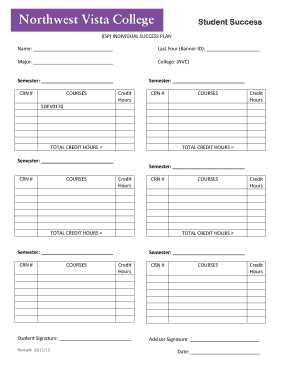
Get Bm-compliance-form.docx. Adobe Designer Template - Alamo
How it works
-

Open form follow the instructions
-

Easily sign the form with your finger
-

Send filled & signed form or save
How to use or fill out the BM-Compliance-Form.docx. Adobe Designer Template - Alamo online
This guide provides comprehensive and user-friendly instructions for filling out the BM-Compliance-Form.docx. Adobe Designer Template - Alamo. By following these steps, users will be able to complete the form accurately and efficiently.
Follow the steps to fill out the BM-Compliance-Form online.
- Press the ‘Get Form’ button to access the BM-Compliance-Form. This will allow you to open the form in your preferred online editing application.
- Begin by entering your name at the designated field. Ensure that you provide your full name as it appears in official documents.
- In the next field, enter the last four digits of your Banner ID. This helps to uniquely identify your records within the system.
- Indicate your major in the specified section. This should reflect your current area of study.
- Select your college from the provided options. For this form, you would typically select 'NVC' for Northwest Vista College.
- Fill in the semester during which you are completing this form. It’s important to ensure this information is accurate for processing.
- For each course section, enter the course name (e.g., SDEV0170) along with the semester and credit hours associated with that course.
- Make sure to calculate and write the total credit hours in the appropriate fields to provide a complete overview of your course load.
- Provide your signature in the designated area, confirming the information inputted is correct.
- At the end of the form, remember to have your advisor sign and date the document to validate your submission.
- After reviewing all entries for accuracy, save your changes, download the completed form, or print it for submission. You can also share it as needed.
Start filling out your BM-Compliance-Form online today to ensure your academic success.
An HTML table consists of one <table> element and one or more <tr>, <th>, and <td> elements. The <tr> element defines a table row, the <th> element defines a table header, and the <td> element defines a table cell. An HTML table may also include <caption>, <colgroup>, <thead>, <tfoot>, and <tbody> elements.
Industry-leading security and compliance
US Legal Forms protects your data by complying with industry-specific security standards.
-
In businnes since 199725+ years providing professional legal documents.
-
Accredited businessGuarantees that a business meets BBB accreditation standards in the US and Canada.
-
Secured by BraintreeValidated Level 1 PCI DSS compliant payment gateway that accepts most major credit and debit card brands from across the globe.