Loading
Get Da Form 3595
How it works
-

Open form follow the instructions
-

Easily sign the form with your finger
-

Send filled & signed form or save
How to fill out the DA Form 3595 online
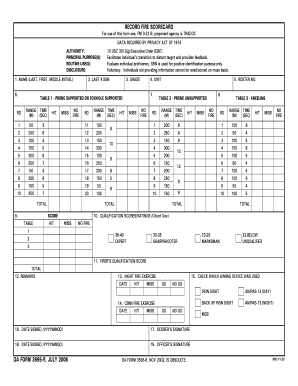
The DA Form 3595 is a critical document used for assessing individual shooting proficiency within armed forces training. This guide provides clear instructions on how to complete the form online, ensuring users can efficiently navigate its components.
Follow the steps to fill out the DA Form 3595 online.
- Click ‘Get Form’ button to obtain the form and open it in the online editor.
- Begin filling in your personal information in Section 1, including your last name, first name, and middle initial. Ensure accuracy as this information will be used for identification purposes.
- In Section 2, enter the last four digits of your Social Security number. This is essential for accurate identification.
- Complete Section 3 by indicating your current grade. Choose from the dropdown options provided.
- Fill in Section 4 with your unit, as it is crucial for organizational purposes.
- Proceed to fill out Table 1, where you will record your shooting scores from different ranges and scenarios. Carefully document hits, misses, and no-fire instances for each exercise.
- Move to Table 2 and complete the prone unsupported scores similarly, ensuring that each entry is accurate and reflects your performance.
- Fill out Table 3 for kneeling position scores, documenting hits and misses based on the provided instructions.
- In Section 10, check the box next to the qualification score that reflects your overall performance.
- Input your remarks in Section 12, which may include any pertinent information regarding your shooting qualifications.
- Indicate which aiming device was used in Section 15, as this can affect your shooting results.
- Complete the date signed fields by entering the date of completion using the format YYYYMMDD.
- Finalize the form by ensuring all sections are filled out accurately, then save your changes, download the form, print it, or share it as needed.
Complete your DA Form 3595 online for a smooth and efficient documentation process.
Department of the Army (DA) offers a form search engine, a publications database and downloads in six formats. Catalogue is organized by divisions and major commands. Visit http://.e-publishing.af.mil/ To access their Forms.