Loading
Form preview
  • US Legal Forms
  • Other Templates
  • More Forms
  • More Uncategorized Forms
  • Qp/401(k) Separation From Service Distribution Request Form - Montereywealth

Get Qp/401(k) Separation From Service Distribution Request Form - Montereywealth

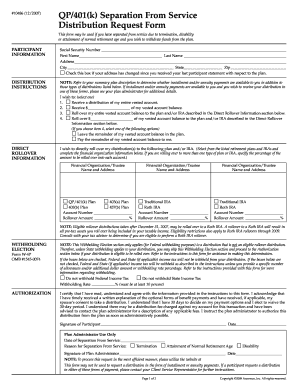
#10486 (12/2007) QP/401(k) Separation From Service Distribution Request Form This form may be used if you have separated from service due to termination, disability or attainment of normal retirement.

How it works

  1. Open form

    Open form follow the instructions

  2. Easily sign form

    Easily sign the form with your finger

  3. Share form

    Send filled & signed form or save

How to fill out the QP/401(k) Separation From Service Distribution Request Form - Montereywealth online

Filling out the QP/401(k) Separation From Service Distribution Request Form can be straightforward with the right guidance. This document is essential for individuals who have separated from service and wish to withdraw their funds. This guide will provide a clear, step-by-step approach to complete the form accurately and efficiently.

Follow the steps to successfully complete your distribution request form.

  1. Press the ‘Get Form’ button to access the QP/401(k) Separation From Service Distribution Request Form. This action will allow you to view the document and prepare for completion.
  2. Begin by entering your participant information. This includes your Social Security number, full name, address, and checking the box if your address has changed since your last participant statement. Ensure all information is accurate to avoid processing delays.
  3. In the distribution instructions section, select one of the four options for how you wish to receive your distribution. For complete withdrawals, select option one. For partial withdrawals, select option two or four, and specify the dollar amount you wish to withdraw.
  4. If you opt for a direct rollover to another plan or IRA, complete the Direct Rollover Information section by providing the name and address of the financial organization or trustee where you want the funds to go. If rolling over to multiple accounts, also specify the percentage amount for each.
  5. Complete the Withholding Election section only if your distribution is not an eligible rollover distribution. Here, you can choose whether to withhold Federal and/or State income tax from your distribution.
  6. In the Authorization section, read the declaration and certify that you understand the information provided. Sign and date the form to authorize the distribution request.
  7. Finally, review your entire form for accuracy. Once confirmed, you can save the changes, download a copy, print it, or share it as required to submit it to your plan administrator.

Complete your QP/401(k) Separation From Service Distribution Request Form online for a smooth distribution process.

Get form

Experience a faster way to fill out and sign forms on the web. Access the most extensive library of templates available.
Get form

Related content

Lowell Farms Inc. - SEC.gov
Learn more
Institutional Self Evaluation Governing Board...
Hawai'i Tokai International College Self-Evaluation Report 2017. 99. Withdrawal or Changes...
Learn more

Related links form

NHSGC Homeownership Preservation Intake Form - Maple Heights ... - Mapleheightsnews New Military Service Record (Form DD214) - County Of San ... - Sbcounty Fort Gordon 210 13 Waiver - Skydive Iowa

Questions & Answers

Get answers to your most pressing questions about US Legal Forms API.

Contact support

Use this form to request a lump-sum distribution or to establish a systematic withdrawal plan from a traditional IRA, Roth IRA, Coverdell ESA, or SEP IRA.

Generally, if your account balance exceeds $5,000, the plan administrator must obtain your consent before making a distribution. Depending on the type of benefit distribution provided under your 401(k) plan, the plan may also require the consent of your spouse before making a distribution.

All distribution requests are sent for approval -- this action is typically completed by your Employer. Once the distribution is reviewed and approved, the payment will be processed. Payments are generally received within 7-10 business days for a check; 5-7 business days for direct deposit (if available).

The Separation from Service exception sometimes called “Rule of 55” or “55 Rule” is an IRS provision that allows workers who leave their job for any reason to start taking penalty-free distributions from their current employer's retirement plan once they've reached age 55.

If you choose a direct rollover distribution, the entire balance of your 401(k) account will be rolled over to the new qualified plan. A check will be mailed to you (unless specified otherwise) and must be deposited by Trustee or Custodian you designated on your Distribution Request Form.

This form is to request a participant withdrawal from your retirement account with your employer. Whether you are rolling over the funds or taking a cash payment, you will need to review the Special Tax Notice included at the end of this form.

Distribution Form means the form prescribed by the Company for use by a Member or a Beneficiary to elect the amount and form of voluntary Distributions and the form of compulsory Distributions.

This notice contains important information about the payment of your vested account balance in your employer's Individual 401(k) Plan.

Get This Form Now!

Use professional pre-built templates to fill in and sign documents online faster. Get access to thousands of forms.
Get form
If you believe that this page should be taken down, please follow our DMCA take down processhere.
Get QP/401(k) Separation From Service Distribution Request Form - Montereywealth
Get form
  • Adoption
  • Bankruptcy
  • Contractors
  • Divorce
  • Home Sales
  • Employment
  • Identity Theft
  • Incorporation
  • Landlord Tenant
  • Living Trust
  • Name Change
  • Personal Planning
  • Small Business
  • Wills & Estates
  • Packages A-Z
  • Affidavits
  • Bankruptcy
  • Bill of Sale
  • Corporate - LLC
  • Divorce
  • Employment
  • Identity Theft
  • Internet Technology
  • Landlord Tenant
  • Living Wills
  • Name Change
  • Power of Attorney
  • Real Estate
  • Small Estates
  • Wills
  • All Forms
  • Forms A-Z
  • Other Templates
  • Legal Hub
  • About Us
  • Help Portal
  • Legal Resources
  • Blog
  • Affiliates
  • Contact Us
  • Delete My Account
  • Site Map
  • Industries
  • Forms in Spanish
  • Localized Forms
  • State-specific Forms
  • Forms Kit
  • Real Estate Handbook
  • All Guides
  • Notarize
  • Incorporation services
  • For Consumers
  • For Small Business
  • For Attorneys
  • USLegal
  • FormsPass
  • pdfFiller
  • signNow
  • altaFlow
  • DocHub
  • Instapage
Form Packages
  • Adoption
  • Bankruptcy
  • Contractors
  • Divorce
  • Home Sales
  • Employment
  • Identity Theft
  • Incorporation
  • Landlord Tenant
  • Living Trust
  • Name Change
  • Personal Planning
  • Small Business
  • Wills & Estates
  • Packages A-Z
Form Categories
  • Affidavits
  • Bankruptcy
  • Bill of Sale
  • Corporate - LLC
  • Divorce
  • Employment
  • Identity Theft
  • Internet Technology
  • Landlord Tenant
  • Living Wills
  • Name Change
  • Power of Attorney
  • Real Estate
  • Small Estates
  • Wills
  • All Forms
  • Forms A-Z
  • Other Templates
Customer Service
  • Legal Hub
  • About Us
  • Help Portal
  • Legal Resources
  • Blog
  • Affiliates
  • Contact Us
  • Delete My Account
  • Site Map
  • Industries
  • Forms in Spanish
  • Localized Forms
  • State-specific Forms
  • Forms Kit
Legal Guides
  • Real Estate Handbook
  • All Guides
Prepared for you
  • Notarize
  • Incorporation services
Our Customers
  • For Consumers
  • For Small Business
  • For Attorneys
Our Sites
  • USLegal
  • FormsPass
  • pdfFiller
  • signNow
  • altaFlow
  • DocHub
  • Instapage
Social Media
Call us now toll free:
+1 833 426 79 33
As seen in:
© Copyright 1999-2026 airSlate Legal Forms, Inc. 17 Station Street, Ste. 203, Brookline, MA 02445
  • Your Privacy Choices
  • Terms of Service
  • Privacy Notice
  • Content Takedown Policy
  • Bug Bounty Program