Loading
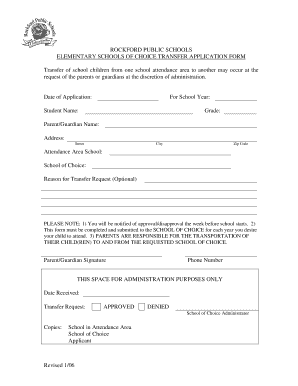
Get Elementary Transfer Application - Rockford Public Schools - Rockfordschools
How it works
-

Open form follow the instructions
-

Easily sign the form with your finger
-

Send filled & signed form or save
How to fill out the Elementary Transfer Application - Rockford Public Schools - Rockfordschools online
This guide provides clear and comprehensive instructions on how to successfully complete the Elementary Transfer Application for Rockford Public Schools online. By following these steps, users will ensure that all required information is accurately submitted for their child's school transfer request.
Follow the steps to complete your application online.
- To begin, locate and press the ‘Get Form’ button to access the Elementary Transfer Application. This will allow you to open the form in an online editor for editing.
- Start filling in the 'Date of Application' field with the current date. This helps the administration track the timing of your request.
- Next, indicate the 'For School Year' by selecting the appropriate academic year for which you are requesting the transfer.
- Enter the 'Student Name' in the provided field. It is essential to use the full name of the child for whom the transfer is requested.
- Select the appropriate 'Grade' the child will be entering in the new school year.
- Provide your 'Parent/Guardian Name' in the designated field. Make sure to fill in your full name as it appears on legal documents.
- In the 'Address' section, complete the fields for 'Street', 'City', and 'Zip Code' to ensure accurate location information for correspondence.
- Identify the 'Attendance Area School' where your child is currently enrolled. This helps the administration understand the context of your transfer request.
- In the 'School of Choice' section, specify the school you are requesting the transfer to. This should be a school you have selected based on your preference.
- Optionally, you may include a 'Reason for Transfer Request' to provide context for your application. This field is not mandatory but can be informative.
- Once all fields are completed, make sure to sign in the 'Parent/Guardian Signature' area. This confirms that you authorize the application.
- Lastly, fill in your 'Phone Number' to ensure that the school can contact you regarding the status of the application.
- After reviewing all inputted information for accuracy, you may save the changes made, download the completed form, print it for your records, or share it as needed.
Begin your application today to ensure your child's school transfer request is processed in a timely manner.
Related links form
IDE Application For An Investigational Device - ICTR - Johns Hopkins ... - Ictr Johnshopkins
MR81 - Application To Change Vehicle Configuration 1.2 ... - SA.Gov.au - Sagov Clients Squiz
Application For Weekly Payments After The Second ... - VWA.vic.gov.au
GIPA Informal Request Application - Wagga Wagga City Council - Wagga Clients Squiz
RPS205 practices the core values of Collaboration, communication, continuous improvement, and commitment.
Industry-leading security and compliance
US Legal Forms protects your data by complying with industry-specific security standards.
-
In businnes since 199725+ years providing professional legal documents.
-
Accredited businessGuarantees that a business meets BBB accreditation standards in the US and Canada.
-
Secured by BraintreeValidated Level 1 PCI DSS compliant payment gateway that accepts most major credit and debit card brands from across the globe.