Loading
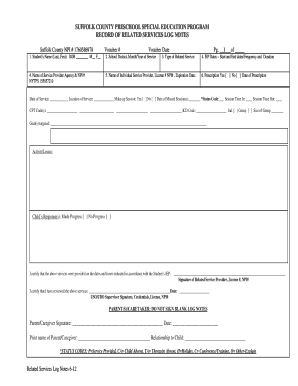
Get Suffolk County Preschool Special Education Program Record Of Related ...
How it works
-

Open form follow the instructions
-

Easily sign the form with your finger
-

Send filled & signed form or save
How to fill out the Suffolk County Preschool Special Education Program Record Of Related Services online
Filling out the Suffolk County Preschool Special Education Program Record Of Related Services is an important process to ensure that children receive the appropriate educational support. This guide will provide you with clear, step-by-step instructions to complete the form online, making the process easier and more efficient.
Follow the steps to complete the form accurately and efficiently.
- Press the ‘Get Form’ button to access the form and open it in your chosen editor.
- Enter the student’s full name in the designated field, including last and first names, and provide their date of birth by selecting the appropriate month, day, and year.
- Indicate the school district along with the month and year services were provided.
- Select the type of related service that was administered, ensuring accuracy in your choice.
- Record the name of the service provider agency along with their NPI number, which uniquely identifies the agency.
- Input the name of the individual service provider and their license number and NPI number. Also, provide the expiration date of their license.
- Document the IEP dates, including the start and end dates, along with the frequency and duration of the service.
- Indicate if a prescription was provided by selecting 'Yes' or 'No' and enter the date of prescription if applicable.
- Fill in the date of service and the location where the service occurred.
- If a make-up session was held, mark 'Yes' or 'No' and specify the date of any missed session(s). Use the status code section to indicate the service status.
- Record session times by entering the time in and time out for the provided service along with relevant CPT and ICD codes.
- Articulate the goals targeted during the session, along with the specific activity or lesson conducted.
- Capture the child’s response to the session, indicating if progress was made or not.
- The individual service provider must sign the form, providing their license number and NPI for verification.
- A designated supervisor should review the recorded information and provide their signature along with credentials, license number, and NPI.
- Parents or caregivers should complete their signature only in the space provided after verifying the information, along with the date and their relationship to the child.
- Ensure all required fields are filled out accurately before saving changes, downloading, printing, or sharing the completed form.
Complete your Suffolk County Preschool Special Education Program Record Of Related Services online today!
EVALUATION. When a child is referred to the CPSE, the parent is given a list of NYSED approved evaluators that provide multi-disciplinary education evaluations. After an approved evaluator is selected by the parent and the parent signs a consent form, the child will be evaluated at no cost to the family.
Industry-leading security and compliance
US Legal Forms protects your data by complying with industry-specific security standards.
-
In businnes since 199725+ years providing professional legal documents.
-
Accredited businessGuarantees that a business meets BBB accreditation standards in the US and Canada.
-
Secured by BraintreeValidated Level 1 PCI DSS compliant payment gateway that accepts most major credit and debit card brands from across the globe.