Loading
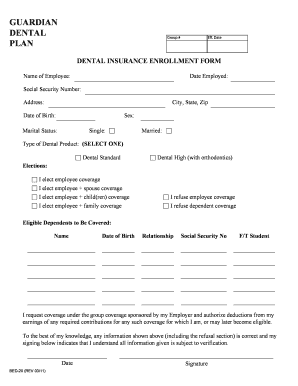
Get Guardian Dental Plan Group # Eff
How it works
-

Open form follow the instructions
-

Easily sign the form with your finger
-

Send filled & signed form or save
How to fill out the GUARDIAN DENTAL PLAN Group # Eff online
Filling out the GUARDIAN DENTAL PLAN Group # Eff form online can simplify the process of enrolling in your dental insurance plan. This guide provides clear, step-by-step instructions to help you complete the enrollment form accurately and efficiently.
Follow the steps to navigate the online enrollment form
- Click the ‘Get Form’ button to obtain the form and open it in the designated editor.
- Begin by entering your name in the designated field for the employee’s name. Ensure the spelling is correct for verification purposes.
- Next, provide the date you were employed. This date is important for establishing your eligibility.
- Then, input your Social Security Number. This information is crucial for identification and account verification.
- Fill in your address, including the city, state, and zip code. Accurate address information is necessary for correspondence purposes.
- Enter your date of birth in the specified format. This helps confirm your identity and eligibility.
- Select your sex by marking the appropriate option.
- Indicate your marital status by choosing between single or married.
- Choose the type of dental product you wish to select from the options provided: Dental Standard or Dental High (with orthodontics).
- Next, make your elections regarding coverage by selecting one of the options available for employee, spouse, child(ren), or family coverage. If you choose to refuse coverage, indicate that as well.
- List any eligible dependents you wish to cover, including their names, dates of birth, relationships, and Social Security Numbers.
- If any dependents are full-time students, please mark the appropriate field for each.
- Read and acknowledge the authorization statement regarding coverage and deductions from your earnings.
- Finally, enter the date and provide your signature to confirm the accuracy of the information given.
- After completing all fields, review the form for any errors, then save your changes. You can also download, print, or share the completed form as needed.
Take the next step towards your dental coverage by completing the GUARDIAN DENTAL PLAN Group # Eff form online today.
With Preventive Advantage, you can receive all preventive care, including exams, cleanings, x-rays and fluoride treatments, without having the benefit expenses deducted from your annual maximum. That means you can stretch your benefit even further for even more savings to you.