Loading
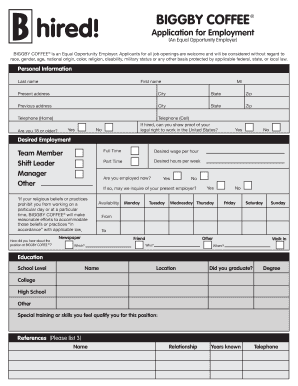
Get Print Application - City Apps
How it works
-

Open form follow the instructions
-

Easily sign the form with your finger
-

Send filled & signed form or save
How to fill out the Print Application - City Apps online
Filling out the Print Application - City Apps online is a straightforward process that allows you to apply for a position efficiently. This guide will walk you through each section of the application form to ensure you provide all necessary information accurately.
Follow the steps to complete your application successfully.
- Click ‘Get Form’ button to obtain the form and open it in the online editor.
- Provide your personal information in the designated fields, such as your last name, first name, middle initial, and current address including city, state, and zip code. If you have a previous address, include that as well.
- Enter your phone numbers for home and cell contacts. Indicate whether you are 18 years of age or older and confirm your legal right to work in the United States.
- Specify the position you are applying for by selecting from team member, shift leader, manager, or other. Indicate your desired wage per hour and your availability for part-time or full-time work.
- Disclose your current employment status and whether you permit inquiries with your current employer. If applicable, indicate any restrictions related to your religious beliefs regarding working days or hours.
- Provide details about your education, including the name and location of institutions attended, whether you graduated, and any applicable degrees.
- List any relevant special training or skills that qualify you for the position you are applying for.
- Complete the references section by listing three individuals who can vouch for your abilities, including their names, relationships to you, how long you have known them, and their contact telephone numbers.
- Fill out your past and present employment history, including company names, addresses, phone numbers, supervisors, dates worked, hourly salary, reasons for leaving, and duties performed for each position.
- Answer the questions regarding previous employment at BIGGBY COFFEE and any relevant convictions, if applicable. Make sure you understand the instructions about disclosing certain criminal records.
- Read the BIGGBY COFFEE agreement carefully and indicate your understanding by providing your signature and the date.
- Finally, ensure all sections are completed thoroughly. Save your changes, download the application for your records, print it for submission, or share it as necessary.
Complete your application online today to take the next step in your career.
It is important to understand the difference between a page break and a section break. A page break simply pushes any information after that page break onto the next page; a section break essentially splits your document into different parts to allow you to apply complex formatting to your document.