Loading
Form preview
  • US Legal Forms
  • Form Library
  • More Forms
  • More Uncategorized Forms
  • Accident Claim Form - Pai

Get Accident Claim Form - Pai

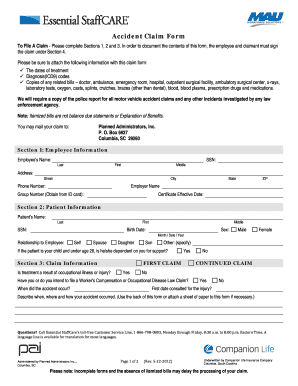
Accident Claim Form To File A Claim - Please complete Sections 1, 2 and 3. In order to document the contents of this form, the employee and claimant must sign the claim under Section 4. Please be.

How it works

  1. Open form

    Open form follow the instructions

  2. Easily sign form

    Easily sign the form with your finger

  3. Share form

    Send filled & signed form or save

How to fill out the Accident Claim Form - PAI online

Filling out the Accident Claim Form - PAI online can help streamline your claim process and ensure that you provide all necessary information. This guide will walk you through each section of the form, offering clear instructions to help you complete it accurately and efficiently.

Follow the steps to complete the Accident Claim Form - PAI online.

  1. Click ‘Get Form’ button to obtain the form and open it in the editor.
  2. Begin with Section 1, which requires employee information. Fill in the employee's name, social security number, address, phone number, employer name, group number, and certificate effective date.
  3. Move to Section 2 for patient information. Input the patient's name, social security number, birth date, sex, and relationship to the employee. If the patient is a child under 26, indicate if they are dependent on the employee for support.
  4. In Section 3, provide claim information regarding whether the treatment is a result of occupational injury or illness. Answer questions regarding Worker’s Compensation claims and specify the accident date. Describe how, when, and where the accident occurred.
  5. Proceed to Section 4 for authorization. This section must be signed by the insured or their legal guardian. Ensure you enter the necessary information and consent to obtain medical records.
  6. If applicable, Section 5 needs to be completed by the attending physician. The doctor will fill in details such as diagnosis, treatment dates, and confirm if the condition was due to an accident.
  7. After completing all sections, review the form for accuracy. Attach necessary documents such as treatment dates, diagnosis codes, and related bills.
  8. Save your changes and download the completed form. You can also print or share the form as needed.

Complete your Accident Claim Form - PAI online today to ensure a smooth claims process.

Get form

Experience a faster way to fill out and sign forms on the web. Access the most extensive library of templates available.
Get form

Related content

Injured Workers | State Accident Fund
PAI will answer all billing inquiries via telephone or email. ... will be included in this...
Learn more
Assocation Proof of Loss Life Insurance Accidental...
Submit completed form to your assigned Claim Office with a certified Death Certificate and...
Learn more
Accident insurance - Wikipedia
Accident insurance is a type of insurance where the policy holder is paid directly in the...
Learn more

Related links form

Bluecare Plus Image LOCAL 2085 ON-LINE COURSES - IBEW 2085 LOCAL 2085 ON LINE COURSES October 2012 - IBEW 2085 Centennial United Methodist Church Foundation Grant Application ... - Centennialumc

Questions & Answers

Get answers to your most pressing questions about US Legal Forms API.

Contact support

Learning How To Claim Car Insurance For Own Damage Step-by-Step Step 1: Notify Your Insurance Company. ... Step 2: Report an FIR to the Police. ... Step 3: Use Photographic Proof. ... Step 4: Provide the Insurance Company with the Necessary Documents. ... Step 5: Fix Your Car. ... Step 6: Claim Settlement Process.

Claim process for emergency hospitalisation with 'reimbursement facility': Get admitted into the hospital. Intimate the claim at RCare Health call centre/E-mail as soon as possible. Settle the hospital bills in full as required. Collect all the original bills, documents and reports at the time of discharge.

After the accident, immediately inform the customer care of the insurance company through the website or the customer care number. Provide the policy documents. Provide the duly filled in claim form. Submit other required documents as per the case – death, partial disability, total disability, etc.

Call the Reliance Toll-free Helpline number and register your claim. Intimate the claim within 24 hours of the accident by calling 1800 3009 toll free. Give the representative your policy number or car license plate number. For third party claims, you need to go to the nearest police station and lodge an FIR.

After the accident, immediately inform the customer care of the insurance company through the website or the customer care number. Provide the policy documents. Provide the duly filled in claim form. Submit other required documents as per the case – death, partial disability, total disability, etc.

To submit your claim, call our Customer Care team at 800-351-7500, prompt 1, Monday through Friday 8:00 AM to 7:00 PM ET.

Get This Form Now!

Use professional pre-built templates to fill in and sign documents online faster. Get access to thousands of forms.
Get form
If you believe that this page should be taken down, please follow our DMCA take down processhere.
Get Accident Claim Form - PAI
Get form
  • Adoption
  • Bankruptcy
  • Contractors
  • Divorce
  • Home Sales
  • Employment
  • Identity Theft
  • Incorporation
  • Landlord Tenant
  • Living Trust
  • Name Change
  • Personal Planning
  • Small Business
  • Wills & Estates
  • Packages A-Z
  • Affidavits
  • Bankruptcy
  • Bill of Sale
  • Corporate - LLC
  • Divorce
  • Employment
  • Identity Theft
  • Internet Technology
  • Landlord Tenant
  • Living Wills
  • Name Change
  • Power of Attorney
  • Real Estate
  • Small Estates
  • Wills
  • All Forms
  • Forms A-Z
  • Form Library
  • Legal Hub
  • About Us
  • Help Portal
  • Legal Resources
  • Blog
  • Affiliates
  • Contact Us
  • Delete My Account
  • Site Map
  • Industries
  • Forms in Spanish
  • Localized Forms
  • State-specific Forms
  • Forms Kit
  • Real Estate Handbook
  • All Guides
  • Notarize
  • Incorporation services
  • For Consumers
  • For Small Business
  • For Attorneys
  • USLegal
  • FormsPass
  • pdfFiller
  • signNow
  • altaFlow
  • DocHub
  • Instapage
Form Packages
  • Adoption
  • Bankruptcy
  • Contractors
  • Divorce
  • Home Sales
  • Employment
  • Identity Theft
  • Incorporation
  • Landlord Tenant
  • Living Trust
  • Name Change
  • Personal Planning
  • Small Business
  • Wills & Estates
  • Packages A-Z
Form Categories
  • Affidavits
  • Bankruptcy
  • Bill of Sale
  • Corporate - LLC
  • Divorce
  • Employment
  • Identity Theft
  • Internet Technology
  • Landlord Tenant
  • Living Wills
  • Name Change
  • Power of Attorney
  • Real Estate
  • Small Estates
  • Wills
  • All Forms
  • Forms A-Z
  • Form Library
Customer Service
  • Legal Hub
  • About Us
  • Help Portal
  • Legal Resources
  • Blog
  • Affiliates
  • Contact Us
  • Delete My Account
  • Site Map
  • Industries
  • Forms in Spanish
  • Localized Forms
  • State-specific Forms
  • Forms Kit
Legal Guides
  • Real Estate Handbook
  • All Guides
Prepared for you
  • Notarize
  • Incorporation services
Our Customers
  • For Consumers
  • For Small Business
  • For Attorneys
Our Sites
  • USLegal
  • FormsPass
  • pdfFiller
  • signNow
  • altaFlow
  • DocHub
  • Instapage
Social Media
Call us now toll free:
+1 833 426 79 33
As seen in:
© Copyright 1999-2026 airSlate Legal Forms, Inc. 3720 Flowood Dr, Flowood, Mississippi 39232
  • Your Privacy Choices
  • Terms of Service
  • Privacy Notice
  • Content Takedown Policy
  • Bug Bounty Program