Loading
Get Retiree Refund Application (form 7a) - Teachers Retirement System ... - Trsl
How it works
-

Open form follow the instructions
-

Easily sign the form with your finger
-

Send filled & signed form or save
How to fill out the Retiree Refund Application (Form 7A) - Teachers Retirement System online
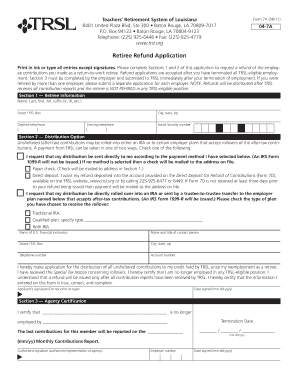
The Retiree Refund Application (Form 7A) is essential for individuals seeking a refund of their employee contributions after returning to work as a retiree. This guide provides a clear and supportive approach to completing the form online, ensuring users can navigate each step effectively.
Follow the steps to complete the Retiree Refund Application form online.
- Use the ‘Get Form’ button to access the Retiree Refund Application and open it for editing.
- In Section 1, provide your retiree information, including your full name (last, first, middle initial), address (street or P.O. Box, city, state, zip), daytime and evening telephone numbers, and Social Security number. Ensure all entries are printed clearly in ink or typed.
- Move to Section 2, where you will select your distribution option. Here you can either request a direct payment to yourself or opt for a rollover into an IRA or employer plan. Make sure to check the appropriate box for your chosen method.
- If choosing direct payment, indicate whether you prefer a paper check or direct deposit. For direct deposit, ensure you have completed the Direct Deposit for Refund of Contributions (Form 7D) and provide the necessary banking details.
- If requesting a rollover, specify the type of receiving plan (Traditional IRA, Roth IRA, or Qualified plan) and include the details of the financial institution or plan, including the institution's name, contact person, and account number.
- Sign the application to certify the information provided is accurate and complete. Include the date of your signature in the required format.
- In Section 3, your employer must complete the Agency Certification. They will confirm your employment termination date and last contributions made. Ensure this section is filled out entirely and signed by an authorized representative.
- Once you have completed the form, you can save changes, download, print, or share the application as needed.
Complete your Retiree Refund Application online today to ensure a smooth process.
Founded in 1936, TRSL is a governmental defined benefit plan qualified under Section 401(a) of the Internal Revenue Code as a public trust fund to provide retirement benefits for its members. TRSL is funded by member and employer contributions and earnings from investments.
Industry-leading security and compliance
US Legal Forms protects your data by complying with industry-specific security standards.
-
In businnes since 199725+ years providing professional legal documents.
-
Accredited businessGuarantees that a business meets BBB accreditation standards in the US and Canada.
-
Secured by BraintreeValidated Level 1 PCI DSS compliant payment gateway that accepts most major credit and debit card brands from across the globe.