Loading
Get Behavioral Health Follow Up Form To Pcp
How it works
-

Open form follow the instructions
-

Easily sign the form with your finger
-

Send filled & signed form or save
How to fill out the Behavioral Health Follow Up Form To PCP online
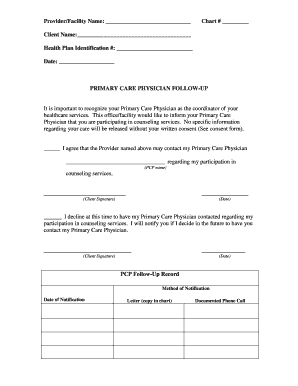
The Behavioral Health Follow Up Form to Primary Care Physician is essential for coordinating care between behavioral health services and primary care providers. This form ensures that your primary care physician is informed of your counseling services, enhancing your overall healthcare experience.
Follow the steps to fill out the form online
- Click the ‘Get Form’ button to obtain the form and open it for editing.
- Fill in the 'Provider/Facility Name' section with the name of the healthcare provider or facility you are associated with.
- Enter your 'Chart #' in the designated field. This is often assigned by your healthcare provider for record-keeping.
- Provide your 'Client Name' in the appropriate field, ensuring it matches your official identification.
- Input your 'Health Plan Identification #' to assist in processing your information accurately.
- Enter the 'Date' of filling out the form to maintain a record of when you submitted this information.
- In the 'Primary Care Physician Follow-Up' section, acknowledge your consent for the provider to contact your primary care physician regarding your counseling. If you agree, write the PCP's name in the specified field and provide your signature and date.
- If you choose not to contact your primary care physician, fill in the decline option, providing your signature and the date.
- Complete the 'PCP Follow-Up Record' section by selecting your method of notification, such as 'Letter' or 'Documented Phone Call,' and include the date of notification.
- After filling out all required fields, review the information for accuracy. Once confirmed, you can save the changes, download, print, or share the completed form as needed.
Complete your Behavioral Health Follow Up Form online today to enhance communication with your primary care provider.
Select where you want the watermark to be on the page. Select Design > Watermark > right-click the watermark you want, and select Insert at Current Document Position. The watermark appears as a text box.
Industry-leading security and compliance
US Legal Forms protects your data by complying with industry-specific security standards.
-
In businnes since 199725+ years providing professional legal documents.
-
Accredited businessGuarantees that a business meets BBB accreditation standards in the US and Canada.
-
Secured by BraintreeValidated Level 1 PCI DSS compliant payment gateway that accepts most major credit and debit card brands from across the globe.