Loading
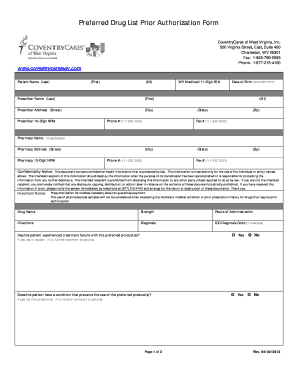
Get Coventry Care Medicaid Form
How it works
-

Open form follow the instructions
-

Easily sign the form with your finger
-

Send filled & signed form or save
How to fill out the Coventry Care Medicaid Form online
This guide provides step-by-step instructions on how to accurately complete the Coventry Care Medicaid Form online. Following these steps will help ensure that your information is submitted correctly and efficiently.
Follow the steps to fill out the Coventry Care Medicaid Form online.
- Press the ‘Get Form’ button to access the Coventry Care Medicaid Form and open it in an online editor.
- Begin filling out the patient details. Enter the patient's last name, first name, middle initial, and date of birth in the designated fields.
- Provide the prescriber's information. Enter the prescriber's last name, first name, middle initial, NPI number, address, and contact numbers.
- If applicable, include the pharmacy name and address, along with the pharmacy's NPI number and contact information.
- When detailing the medication, input the drug name, strength, route of administration, directions for use, and diagnosis. If available, also include the ICD diagnosis code.
- Respond to the questions about the patient's treatment history. Indicate whether the patient has experienced treatment failure with preferred products, has conditions preventing the use of these products, or experiences intolerable side effects.
- Complete the attestation section by providing the prescriber or pharmacist's signature, either manually or electronically, along with the date.
- Review all entered information for accuracy. Once satisfied, you can save your changes, download a copy, print the form, or share it as necessary.
Complete your Coventry Care Medicaid Form online today to ensure a smooth application process.