Loading
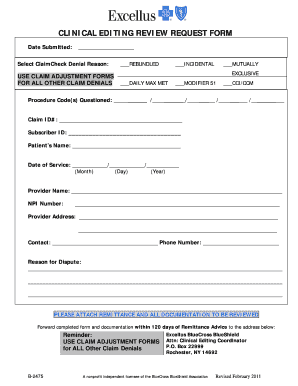
Get Clinical Editing Review Request Form - Excellus Bluecross ...
How it works
-

Open form follow the instructions
-

Easily sign the form with your finger
-

Send filled & signed form or save
How to fill out the CLINICAL EDITING REVIEW REQUEST FORM - Excellus BlueCross online
Filling out the Clinical Editing Review Request Form for Excellus BlueCross online is a straightforward process that ensures your claims are reviewed accurately. This guide provides clear instructions to assist you in completing each section of the form effectively.
Follow the steps to successfully complete the form.
- Click ‘Get Form’ button to obtain the form and open it in the editor.
- Begin by entering the date you are submitting the request in the 'Date Submitted' field. Ensure the format is consistent and clear.
- In the 'Select ClaimCheck Denial Reason' section, choose the appropriate reason for the denial by checking the corresponding box. Options include 'Rebundled', 'Incidental', 'Mutually exclusive', and 'Daily Max Met'.
- List the questioned procedure codes in the 'Procedure Code(s) Questioned' field. Include any applicable modifiers by checking the appropriate boxes next to them.
- Enter the 'Claim ID#' and 'Subscriber ID' in their respective fields to ensure proper identification of the claim.
- Fill in the patient's name and the date of service, ensuring the date is formatted as Month/Day/Year.
- Provide the provider's name and NPI number in the designated fields, followed by the provider's address and a contact person's name and phone number.
- In the 'Reason for Dispute' section, write a detailed explanation of why you are disputing the claim. Be clear and concise to support your request.
- Ensure you attach any relevant remittance and documentation necessary for the review process.
- Once you have completed the form, save your changes and download or print a copy for your records. You can then forward the completed form and attached documentation to the designated address.
Complete your Clinical Editing Review Request Form online today to ensure your claims are reviewed efficiently.
Claims editing is a step in the claims payment cycle that involves verifying that physician-submitted bills are coded correctly. ... When selecting a third-party editing system, payers have a number of options to choose from and strategic decisions to make. Editing vendors typically have millions of edits in their systems.
Industry-leading security and compliance
US Legal Forms protects your data by complying with industry-specific security standards.
-
In businnes since 199725+ years providing professional legal documents.
-
Accredited businessGuarantees that a business meets BBB accreditation standards in the US and Canada.
-
Secured by BraintreeValidated Level 1 PCI DSS compliant payment gateway that accepts most major credit and debit card brands from across the globe.