Loading
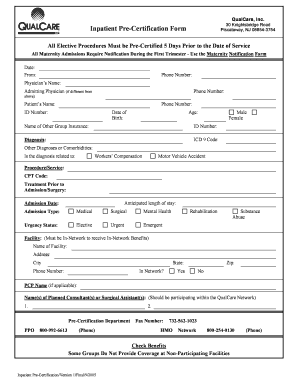
Get Inpatient Pre-certification Form - Qualcare Inc.
How it works
-

Open form follow the instructions
-

Easily sign the form with your finger
-

Send filled & signed form or save
How to fill out the Inpatient Pre-Certification Form - QualCare Inc. online
Filling out the Inpatient Pre-Certification Form for QualCare Inc. is a crucial step in ensuring that necessary medical procedures are properly authorized. This guide will provide you with clear, step-by-step instructions to assist you in completing the form efficiently and accurately.
Follow the steps to complete your Pre-Certification Form online.
- Click ‘Get Form’ button to obtain the form and open it in the editor.
- Begin by entering today's date in the designated field to indicate when the pre-certification request is being submitted.
- Provide your contact phone number for any follow-up communication related to the pre-certification.
- Complete the physician's details, including the physician’s name and phone number. If an admitting physician differs from the listed physician, include their information in the designated area.
- Fill in the patient's information, including their name, phone number, identification number, date of birth, and age.
- Indicate the patient's gender by selecting either 'Male' or 'Female'.
- If applicable, provide the name and ID number of other group insurance coverage.
- Document the primary diagnosis and corresponding ICD 9 code within the provided fields.
- List any additional diagnoses or comorbidities that may be relevant to the patient's condition.
- Specify if the diagnosis is related to workers' compensation or a motor vehicle accident by selecting the appropriate option.
- Enter the procedure or service being requested along with the relevant CPT code.
- Detail any treatment that the patient has undergone prior to the planned admission or surgery.
- Estimate the anticipated length of stay for the patient following the procedure.
- Document the proposed admission date and select the type of admission: medical, surgical, or mental health.
- Choose the urgency status of the admission by selecting from elective, urgent, emergent, rehabilitation, or substance abuse.
- Indicate the facility's name and address where the procedure will take place. Ensure that the facility is in-network to receive appropriate benefits.
- Provide the phone number for the facility and confirm if it is in-network by selecting 'Yes' or 'No'.
- Include the name of the primary care physician if applicable, and list any planned consultants or surgical assistants who are part of the QualCare network.
- Review all entries for accuracy. Once you have filled out the form completely, you can save changes, download a copy, print the form, or share it as necessary.
Complete your Inpatient Pre-Certification Form online today to ensure timely processing and authorization.
An affidavit is a statement made by a person before the court or an appropriate adjudicating authority, wherein the deponent (the person who makes the statement) states the facts and information related to the matter in dispute, in his knowledge and swears it to be true.
Industry-leading security and compliance
US Legal Forms protects your data by complying with industry-specific security standards.
-
In businnes since 199725+ years providing professional legal documents.
-
Accredited businessGuarantees that a business meets BBB accreditation standards in the US and Canada.
-
Secured by BraintreeValidated Level 1 PCI DSS compliant payment gateway that accepts most major credit and debit card brands from across the globe.