Loading
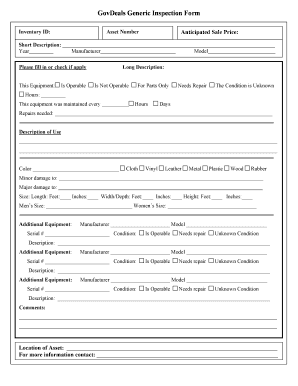
Get Govdeals Generic Inspection Form
How it works
-

Open form follow the instructions
-

Easily sign the form with your finger
-

Send filled & signed form or save
How to fill out the GovDeals Generic Inspection Form online
Filling out the GovDeals Generic Inspection Form online is essential for accurately documenting the condition of the equipment being sold. This guide provides detailed steps to ensure users can complete the form thoroughly and effectively.
Follow the steps to complete the form successfully.
- Press the ‘Get Form’ button to access the inspection form, opening it in your preferred editor.
- Input the inventory ID and asset number in the designated fields to identify the equipment being inspected.
- Enter the anticipated sale price in the appropriate field to provide a clear expectation of value.
- Provide a short description of the equipment, followed by details such as year, manufacturer, and model.
- Indicate the equipment's operability status by checking the relevant box, selecting from options like 'Is Operable,' 'Not Operable,' 'For Parts Only,' 'Needs Repair,' or 'Condition Unknown.'
- Fill out the hours of operation for the equipment and state the maintenance frequency in hours or days.
- Detail any needed repairs and provide a description of how the equipment was used in the respective sections.
- Specify the color of the equipment and check the corresponding material type from the options provided.
- Document any minor or major damages in the designated fields to inform potential buyers of the equipment's condition.
- Measure and input the dimensions of the equipment, including length, width/depth, and height.
- If applicable, fill out information about additional equipment by providing the manufacturer, model, serial number, and condition.
- Add any comments that may be relevant for potential buyers in the comments section.
- State the location of the asset so that interested parties know where it can be found for inspection.
- Provide contact information for further inquiries about the asset.
- Once all information is accurately filled out, save the changes, download the document, print it, or share it as needed.
Complete your GovDeals Generic Inspection Form online today.
<input> elements of type email are used to let the user enter and edit an email address, or, if the multiple attribute is specified, a list of email addresses.
Industry-leading security and compliance
US Legal Forms protects your data by complying with industry-specific security standards.
-
In businnes since 199725+ years providing professional legal documents.
-
Accredited businessGuarantees that a business meets BBB accreditation standards in the US and Canada.
-
Secured by BraintreeValidated Level 1 PCI DSS compliant payment gateway that accepts most major credit and debit card brands from across the globe.