Loading
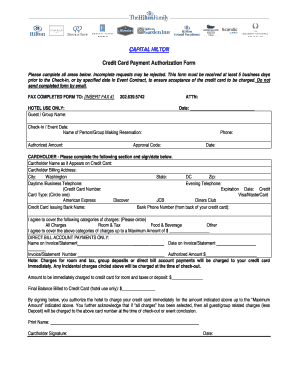
Get Hilton Credit Card Authorization Form
How it works
-

Open form follow the instructions
-

Easily sign the form with your finger
-

Send filled & signed form or save
How to fill out the Hilton Credit Card Authorization Form online
Navigating the Hilton Credit Card Authorization Form can seem daunting, but with clear guidelines, users can complete it efficiently. This guide provides a step-by-step approach to ensure that all necessary information is accurately filled in for a smooth authorization process.
Follow the steps to fill out the Hilton Credit Card Authorization Form easily.
- Press ‘Get Form’ button to access the form and open it in the online editor.
- Begin by entering the guest or group name in the designated field.
- Include the attention line with the relevant contact person.
- Fill in the date of completion to establish when the form was completed.
- Indicate the check-in or event date to ensure proper scheduling.
- Enter the name of the person or group making the reservation.
- Specify the authorized amount that can be charged to the credit card.
- Provide an approval code, if applicable, as prompted.
- Enter your phone number for contact related to the authorization.
- In the cardholder section, fill out the cardholder's name exactly as it appears on the credit card.
- Include the billing address, city, state, and zip code associated with the card.
- List daytime or business and evening phone numbers for further verification.
- Input the credit card number and expiration date.
- Select the credit card type from the provided options, circling the appropriate choice.
- Write down the credit card issuing bank name and the corresponding bank phone number found on the back of the card.
- Indicate the categories of charges you agree to cover by circling the relevant options.
- Specify the maximum amount to be charged if applicable.
- For direct bill account payments, fill in the name on the invoice, date, invoice number, and authorized amount.
- Confirm and record the amount that will be charged immediately for the room and taxes or deposit.
- Sign the form to authorize the hotel to charge the card and include the date of signature.
- Once completed, save the changes, and ensure to download, print, or share the form as needed.
Complete your Hilton Credit Card Authorization Form online today!
After a client has signed and completed the credit card authorization form, you will need to provide a secure, encrypted email connection for them to send it back to you. ... Just sending a pdf via email is not a great idea unless the PDF is password-protected and the password is sent via secure, encrypted email.