Loading
Get Uisd Athletics
How it works
-

Open form follow the instructions
-

Easily sign the form with your finger
-

Send filled & signed form or save
How to fill out the Uisd Athletics online
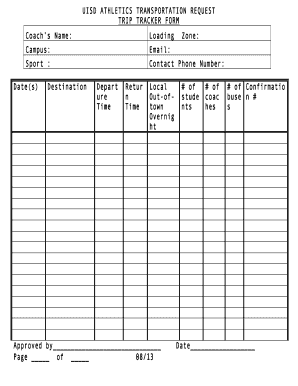
Filling out the Uisd Athletics Transportation Request Form is a crucial step for coaches and teams to plan their trips effectively. This guide will take you through each section of the form to ensure accurate and efficient completion.
Follow the steps to complete your transportation request form.
- Press the ‘Get Form’ button to access the form and open it in your editor.
- Begin by entering the coach's name in the designated field. Ensure that the name provided is accurate for verification purposes.
- In the 'Campus' section, indicate the campus associated with the sports team. This helps in identifying the location of the team.
- Provide your email address to facilitate communication regarding the trip details.
- Select the sport that the request relates to from the drop-down menu or input field provided.
- Enter your contact phone number to ensure accessibility for inquiries or updates regarding the trip.
- Specify the date(s) of travel in the appropriate field to ensure clarity on the itinerary.
- Detail the destination of the trip clearly to avoid any confusion.
- Fill in the departure time and return time in the respective fields, ensuring they are accurate for transportation arrangements.
- Indicate whether the trip is local, out-of-town, or an overnight stay by selecting the applicable option.
- In the approved by section, leave space for signature or initials to indicate authorization.
- Provide the zone number, number of students attending, number of coaches, and the number of confirmation bus numbers required.
- Finally, input the date at the bottom of the form before submitting it.
- Once completed, you can save changes, download, or print the form for your records or share it with relevant stakeholders.
Ensure your transportation request is processed efficiently by completing the Uisd Athletics form online now.
There are 2 main types of licenses used in stock photography: Rights Managed and Royalty Free. A Rights Managed license gives the user permission to use an image for a specific purpose only and the price charged relates to this usage.