Loading
Get Class B Volunteer Form - Special Olympics Florida - L B5z
How it works
-

Open form follow the instructions
-

Easily sign the form with your finger
-

Send filled & signed form or save
How to fill out the Class B Volunteer Form - Special Olympics Florida - L B5z online
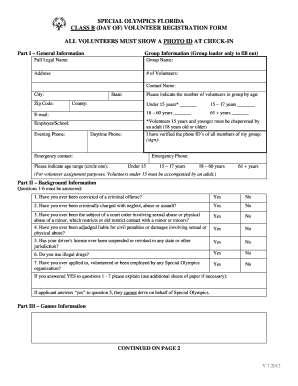
Filling out the Class B Volunteer Form for Special Olympics Florida is a vital step to ensure your registration as a volunteer is smooth and efficient. This guide provides clear and comprehensive instructions on how to complete the form online, ensuring that you provide all necessary information accurately.
Follow the steps to complete your Class B Volunteer Form online.
- Click the ‘Get Form’ button to obtain the form and open it in the document editor.
- Begin with Part I – General Information. Fill in your full legal name, group name, address, and contact details. Specify the number of volunteers in your group by indicating their age ranges.
- Continue with Part II – Background Information. Answer all the questions thoroughly, providing truthful responses as necessary. If you answer 'yes' to any questions, be prepared to provide additional explanations.
- Proceed to Part III – Games Information. Review the certification statement and confirm its accuracy before signing.
- If you are a parent or guardian signing for a minor, ensure to complete the signature section, including your name and the date.
- Finally, once you have filled out both sides of the form, choose to save your changes, download the completed form, or print and share it as needed.
Complete your Class B Volunteer Form today and make a difference in your community!
Help out as an administrative volunteer, help with data entry, join our Games Organizing Committee, or be a mentor to an athlete!