We use cookies to improve security, personalize the user experience, enhance our marketing activities (including cooperating with our marketing partners) and for other business use.
Click "here" to read our Cookie Policy. By clicking "Accept" you agree to the use of cookies. Read less
Read more
Accept
Loading
Form preview
  • US Legal Forms
  • Form Library
  • More Forms
  • More Uncategorized Forms
  • Business Card Employee Change Form - Us Bank

Get Business Card Employee Change Form - Us Bank

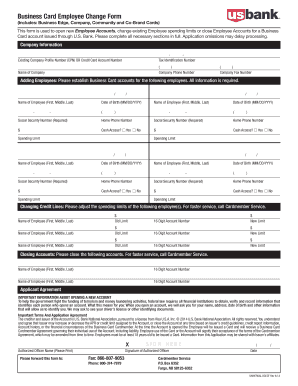
Business Card Employee Change Form (Includes: Business Edge, Company, Community and Co-Brand Cards) This form is used to open new Employee Accounts, change existing Employee spending limits or close.

How it works

  1. Open form

    Open form follow the instructions

  2. Easily sign form

    Easily sign the form with your finger

  3. Share form

    Send filled & signed form or save

How to fill out the Business Card Employee Change Form - US Bank online

The Business Card Employee Change Form is an essential document for managing employee accounts issued through U.S. Bank. This guide provides you with a comprehensive step-by-step approach to accurately fill out the form and ensure smooth processing of your requests.

Follow the steps to complete the Business Card Employee Change Form online.

  1. Press the ‘Get Form’ button to access the Business Card Employee Change Form and open it for editing.
  2. Begin by entering the required company information, including the Existing Company Profile Number or Credit Card Account Number, Tax Identification Number, Name of Company, Company Phone Number, and Company Fax Number.
  3. For adding employees, provide complete details for each employee including their Name (First, Middle, Last), Date of Birth (in MM/DD/YYYY format), Social Security Number, Home Phone Number, and whether they will have Cash Access. Additionally, specify the Spending Limit for each employee.
  4. If you need to adjust credit lines for existing employees, fill in the Name of the Employee, Old Spending Limit, 16-Digit Account Number, and the New Limit for each employee as necessary.
  5. To close employee accounts, indicate the Name of Employee and their corresponding 16-Digit Account Number for each account that needs to be closed.
  6. Review the Applicant Agreement section thoroughly, ensuring you understand the important information about account opening and terms. Sign and date the form where indicated as the Authorized Officer.
  7. After completing all sections, you can choose to save changes, download, print, or share the form as needed.

Complete your documentation process online by filling out the Business Card Employee Change Form today.

Get form

Experience a faster way to fill out and sign forms on the web. Access the most extensive library of templates available.
Get form

Related content

US Bank Cardholder Guide - USDA OCFO
Instructions for the Use of the U.S. Bank Travel Card . ... you, an employee of the...
Learn more
US Bank Corporate Travel Card | Financial...
Any UW employee who travels on UW business at least once per year is encouraged to obtain...
Learn more
JPMorgan Chase - Wikipedia
JPMorgan Chase & Co. is an American multinational investment bank and financial services...
Learn more

Related links form

MEGAFLAT DRIVE OVER - WALK OVER - Simes - Simes Part C - Bright Horizons Foundation - Brighthorizonsfoundation Post-Secondary Application Form - Kahnawake Education Center Leisure Card Application Form - Portsmouth City Council - Portsmouth Gov

Questions & Answers

Get answers to your most pressing questions about US Legal Forms API.

Contact support

It's generally not too difficult to get approved for business credit cards from U.S. Bank.

U.S. Bank Mobile App Open the main menu, choose Manage cards, then select the debit card to replace. Select Order a new card within the Control section, then choose the reason for the card replacement. An image of your debit card will display. Change to a new card design or keep the existing one, then select Next.

For the best mobile banking experience, we recommend logging in or downloading the U.S. Bank Mobile App. Open the main menu in the upper left corner and select Manage Cards. ... Select Add an employee, then select Add employee. Complete the form, then select Continue at the bottom of the page.

Employee cards are credit or debit cards that businesses give to certain workers. The workers are able to use the employee cards to make business-related purchases or payments without having to complete requisition forms and to wait for approvals.

One of the easiest U.S. Bank credit cards to get is the U.S. Bank Secured Visa® Card, which accepts applicants with bad credit and has a $0 annual fee. In addition, most U.S. Bank's co-branded credit cards require good credit, or a credit score of at least 700.

It's generally not too difficult to get approved for business credit cards from U.S. Bank.

Most U.S. Bank credit cards are intended for consumers with good credit, which is a FICO® Score of 670 or higher. If your credit score isn't there yet, U.S. Bank also offers secured credit cards that don't have a minimum credit score requirement.

This way, you'll find out if your application is approved, denied, or pending. In any case, it shouldn't take much longer than a week to get a final decision. If you're approved, your card will arrive in the mail within 7-10 business days of the decision being reached.

Get This Form Now!

Use professional pre-built templates to fill in and sign documents online faster. Get access to thousands of forms.
Get form
If you believe that this page should be taken down, please follow our DMCA take down processhere.

Industry-leading security and compliance

US Legal Forms protects your data by complying with industry-specific security standards.
  • In businnes since 1997
    25+ years providing professional legal documents.
  • Accredited business
    Guarantees that a business meets BBB accreditation standards in the US and Canada.
  • Secured by Braintree
    Validated Level 1 PCI DSS compliant payment gateway that accepts most major credit and debit card brands from across the globe.
Get Business Card Employee Change Form - US Bank
Get form
Form Packages
Adoption
Bankruptcy
Contractors
Divorce
Home Sales
Employment
Identity Theft
Incorporation
Landlord Tenant
Living Trust
Name Change
Personal Planning
Small Business
Wills & Estates
Packages A-Z
Form Categories
Affidavits
Bankruptcy
Bill of Sale
Corporate - LLC
Divorce
Employment
Identity Theft
Internet Technology
Landlord Tenant
Living Wills
Name Change
Power of Attorney
Real Estate
Small Estates
Wills
All Forms
Forms A-Z
Form Library
Customer Service
Terms of Service
Privacy Notice
Legal Hub
Content Takedown Policy
Bug Bounty Program
About Us
Help Portal
Legal Resources
Blog
Affiliates
Contact Us
Delete My Account
Site Map
Industries
Forms in Spanish
Localized Forms
State-specific Forms
Forms Kit
Legal Guides
Real Estate Handbook
All Guides
Prepared for You
Notarize
Incorporation services
Our Customers
For Consumers
For Small Business
For Attorneys
Our Sites
US Legal Forms
USLegal
FormsPass
pdfFiller
signNow
airSlate WorkFlow
DocHub
Instapage
Social Media
Call us now toll free:
+1 833 426 79 33
As seen in:
  • USA Today logo picture
  • CBC News logo picture
  • LA Times logo picture
  • The Washington Post logo picture
  • AP logo picture
  • Forbes logo picture
© Copyright 1997-2025
airSlate Legal Forms, Inc.
3720 Flowood Dr, Flowood, Mississippi 39232
Form Packages
Adoption
Bankruptcy
Contractors
Divorce
Home Sales
Employment
Identity Theft
Incorporation
Landlord Tenant
Living Trust
Name Change
Personal Planning
Small Business
Wills & Estates
Packages A-Z
Form Categories
Affidavits
Bankruptcy
Bill of Sale
Corporate - LLC
Divorce
Employment
Identity Theft
Internet Technology
Landlord Tenant
Living Wills
Name Change
Power of Attorney
Real Estate
Small Estates
Wills
All Forms
Forms A-Z
Form Library
Customer Service
Terms of Service
Privacy Notice
Legal Hub
Content Takedown Policy
Bug Bounty Program
About Us
Help Portal
Legal Resources
Blog
Affiliates
Contact Us
Delete My Account
Site Map
Industries
Forms in Spanish
Localized Forms
State-specific Forms
Forms Kit
Legal Guides
Real Estate Handbook
All Guides
Prepared for You
Notarize
Incorporation services
Our Customers
For Consumers
For Small Business
For Attorneys
Our Sites
US Legal Forms
USLegal
FormsPass
pdfFiller
signNow
airSlate WorkFlow
DocHub
Instapage
Social Media
Call us now toll free:
+1 833 426 79 33
As seen in:
  • USA Today logo picture
  • CBC News logo picture
  • LA Times logo picture
  • The Washington Post logo picture
  • AP logo picture
  • Forbes logo picture
© Copyright 1997-2025
airSlate Legal Forms, Inc.
3720 Flowood Dr, Flowood, Mississippi 39232