We use cookies to improve security, personalize the user experience, enhance our marketing activities (including cooperating with our marketing partners) and for other business use.
Click "here" to read our Cookie Policy. By clicking "Accept" you agree to the use of cookies. Read less
Read more
Accept
Loading
Form preview
  • US Legal Forms
  • Form Library
  • More Forms
  • More Uncategorized Forms
  • Bexley Eps Nomination Form - Nhs Bexley Ccg - Bexleyccg Nhs

Get Bexley Eps Nomination Form - Nhs Bexley Ccg - Bexleyccg Nhs

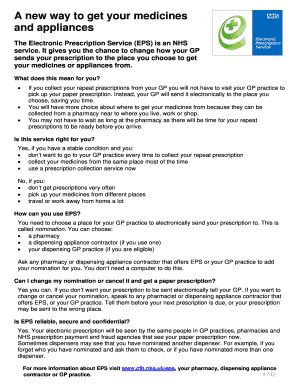
A new way to get your medicines and appliances The Electronic Prescription Service (EPS) is an NHS service. It gives you the chance to change how your GP sends your prescription to the place you choose.

How it works

  1. Open form

    Open form follow the instructions

  2. Easily sign form

    Easily sign the form with your finger

  3. Share form

    Send filled & signed form or save

How to fill out the Bexley EPS Nomination Form - NHS Bexley CCG - Bexleyccg Nhs online

Filling out the Bexley EPS Nomination Form is a crucial step in managing your electronic prescriptions effectively. This guide provides straightforward instructions to help you navigate each section of the form with ease.

Follow the steps to successfully complete your nomination form.

  1. Click ‘Get Form’ button to access the nomination form and open it in the editor.
  2. Fill in your first name and surname in the designated fields. Ensure that the names match those in official documents.
  3. Provide your address, including your postcode. This information is necessary for verification purposes.
  4. Enter your date of birth and NHS number. These details help to identify you correctly in the NHS system.
  5. Confirm that you are the patient by checking the box that indicates you understand the nomination process as explained by the staff.
  6. Fill in the name and address of your nominated dispenser. This could be a pharmacy or appliance contractor.
  7. Sign the form as the patient or, if applicable, by your representative. Ensure the date is included.
  8. Provide your contact details, including telephone numbers for home, mobile, and work, along with your email address if available.
  9. If a patient representative has signed, include their telephone number in the appropriate field.
  10. Once completed, review all entries for accuracy. You can then save changes, download, print, or share the form as needed.

Complete your nomination form online to manage your electronic prescriptions more efficiently.

Get form

Experience a faster way to fill out and sign forms on the web. Access the most extensive library of templates available.
Get form

Related content

(PDF) The evaluation of the electronic...
The Electronic Prescription Service (EPS), as developed for the NHS in England over ... In...
Learn more

Related links form

CAS Formal Training Form The Candidate Must Have A Minimum Of ... - Sspc ABT Synod Remittance Form Level 2 Registration Packet - MR4 - Mr4 Activity Plan Template - Ryerson University - Ryerson

Questions & Answers

Get answers to your most pressing questions about US Legal Forms API.

Contact support

A page break is a special marker that will end the current page and start a new one. Click to place your cursor where you want to start a new page.

Navigate to where you want to create the page break and position your cursor there — usually at the start of a new topic, header, or paragraph. From the dropdown, select Insert > Break > Page break. This separates the point of your selected text into a new page.

If you select to view the non-printing characters in a document after you set page breaks in Word, you will see that a manual page break is identifiable by the words “Page Break” in the center of a dashed line within the document.

The first type of document break is the page break, which partitions only the body text of the document. Of this type there are three kinds: simple page breaks, column page breaks, and text wrapping page breaks.

Page breaks are used when you don't want to add any more content to a certain page. For example, when you are starting a new section of a report or a new chapter of a book. It can also be used when you don't have enough space on the current page to insert, let's say, a table.

A page break is a special marker that will end the current page and start a new one. Click to place your cursor where you want to start a new page. Click the Insert tab. If necessary, expand the Pages group by clicking it.

Place the insertion point where you want to create the page break. In our example, we'll place it at the beginning of our headings. On the Insert tab, click the Page Break command. Alternatively, you can press Ctrl+Enter on your keyboard.

Insert a page break Place the cursor where you want to start a new page. Select Insert > Page Break.

Get This Form Now!

Use professional pre-built templates to fill in and sign documents online faster. Get access to thousands of forms.
Get form
If you believe that this page should be taken down, please follow our DMCA take down processhere.

Industry-leading security and compliance

US Legal Forms protects your data by complying with industry-specific security standards.
  • In businnes since 1997
    25+ years providing professional legal documents.
  • Accredited business
    Guarantees that a business meets BBB accreditation standards in the US and Canada.
  • Secured by Braintree
    Validated Level 1 PCI DSS compliant payment gateway that accepts most major credit and debit card brands from across the globe.
Get Bexley EPS Nomination Form - NHS Bexley CCG - Bexleyccg Nhs
Get form
Form Packages
Adoption
Bankruptcy
Contractors
Divorce
Home Sales
Employment
Identity Theft
Incorporation
Landlord Tenant
Living Trust
Name Change
Personal Planning
Small Business
Wills & Estates
Packages A-Z
Form Categories
Affidavits
Bankruptcy
Bill of Sale
Corporate - LLC
Divorce
Employment
Identity Theft
Internet Technology
Landlord Tenant
Living Wills
Name Change
Power of Attorney
Real Estate
Small Estates
Wills
All Forms
Forms A-Z
Form Library
Customer Service
Terms of Service
Privacy Notice
Legal Hub
Content Takedown Policy
Bug Bounty Program
About Us
Help Portal
Legal Resources
Blog
Affiliates
Contact Us
Delete My Account
Site Map
Industries
Forms in Spanish
Localized Forms
State-specific Forms
Forms Kit
Legal Guides
Real Estate Handbook
All Guides
Prepared for You
Notarize
Incorporation services
Our Customers
For Consumers
For Small Business
For Attorneys
Our Sites
US Legal Forms
USLegal
FormsPass
pdfFiller
signNow
airSlate WorkFlow
DocHub
Instapage
Social Media
Call us now toll free:
+1 833 426 79 33
As seen in:
  • USA Today logo picture
  • CBC News logo picture
  • LA Times logo picture
  • The Washington Post logo picture
  • AP logo picture
  • Forbes logo picture
© Copyright 1997-2025
airSlate Legal Forms, Inc.
3720 Flowood Dr, Flowood, Mississippi 39232
Form Packages
Adoption
Bankruptcy
Contractors
Divorce
Home Sales
Employment
Identity Theft
Incorporation
Landlord Tenant
Living Trust
Name Change
Personal Planning
Small Business
Wills & Estates
Packages A-Z
Form Categories
Affidavits
Bankruptcy
Bill of Sale
Corporate - LLC
Divorce
Employment
Identity Theft
Internet Technology
Landlord Tenant
Living Wills
Name Change
Power of Attorney
Real Estate
Small Estates
Wills
All Forms
Forms A-Z
Form Library
Customer Service
Terms of Service
Privacy Notice
Legal Hub
Content Takedown Policy
Bug Bounty Program
About Us
Help Portal
Legal Resources
Blog
Affiliates
Contact Us
Delete My Account
Site Map
Industries
Forms in Spanish
Localized Forms
State-specific Forms
Forms Kit
Legal Guides
Real Estate Handbook
All Guides
Prepared for You
Notarize
Incorporation services
Our Customers
For Consumers
For Small Business
For Attorneys
Our Sites
US Legal Forms
USLegal
FormsPass
pdfFiller
signNow
airSlate WorkFlow
DocHub
Instapage
Social Media
Call us now toll free:
+1 833 426 79 33
As seen in:
  • USA Today logo picture
  • CBC News logo picture
  • LA Times logo picture
  • The Washington Post logo picture
  • AP logo picture
  • Forbes logo picture
© Copyright 1997-2025
airSlate Legal Forms, Inc.
3720 Flowood Dr, Flowood, Mississippi 39232