Loading
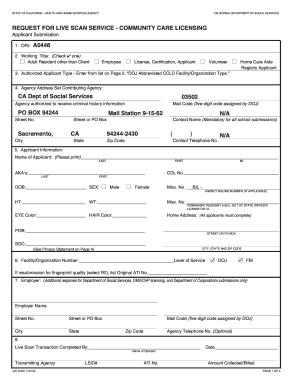
Get Request For Live Scan Service - Community Care Licensing ... - Cdss Ca
How it works
-

Open form follow the instructions
-

Easily sign the form with your finger
-

Send filled & signed form or save
How to fill out the REQUEST FOR LIVE SCAN SERVICE - COMMUNITY CARE LICENSING online
Filling out the Request for Live Scan Service form is a crucial step for individuals seeking employment or volunteer opportunities within community care licensing in California. This guide provides clear, step-by-step instructions to help users complete the form accurately and efficiently.
Follow the steps to complete the Request for Live Scan Service form online.
- Use the ‘Get Form’ button to access the form and open it in your preferred editor for completion.
- In the 'ORI' field, enter the preprinted code 'A0448' to identify the type of response.
- Select the appropriate working title by checking one of the options: adult resident other than client, employee, license/certification applicant, volunteer, or home care aide registry applicant.
- In the 'Authorized Applicant Type' section, refer to page 2 of the form and select the corresponding DOJ abbreviated facility type for your role.
- Fill in the agency address section with the CA Department of Social Services information as preprinted: PO Box 94244, Sacramento, CA 94244-2430.
- Print your full name in the 'Applicant Information' section, including last name, first name, and middle initial. If applicable, list any other names you have used (aka's).
- Provide your date of birth, gender, height, weight, and any other required identification numbers, such as California driver's license or ID, and social security number (optional).
- Enter your home address, including street or PO box, city, state, and zip code. Make sure that all details are accurate.
- Specify the facility or organization number and level of service (DOJ/FBI) required for your application.
- If applicable, indicate if this is a resubmission due to fingerprint quality issues by entering the original Applicant Tracking Information (ATI) number.
- Complete the employer's details if required. This includes employer name, address, mail code, and optional agency telephone number.
- The 'Live Scan Transaction Completed By' section will be filled out by the Live Scan operator. Remember to take two copies of the form to your appointment for processing.
- Once you have filled out all necessary sections, review the information for accuracy. You can then save your changes, download the filled form, print it for your records, or share it as needed.
Start completing your Request for Live Scan Service form online today to ensure a smooth application process.
You must bring the following to the Live Scan site: A completed Request For Live Scan Service (PDF) form. A current photo identification. A fingerprint processing fee and an additional rolling fee. Please call the Live Scan site to verify the amount of the rolling fee.