Loading
Get The Walsh Group - San Diego Contracting Opportunities Center - Ptac-sandiego
How it works
-

Open form follow the instructions
-

Easily sign the form with your finger
-

Send filled & signed form or save
How to fill out the The Walsh Group - San Diego Contracting Opportunities Center - Ptac-sandiego online
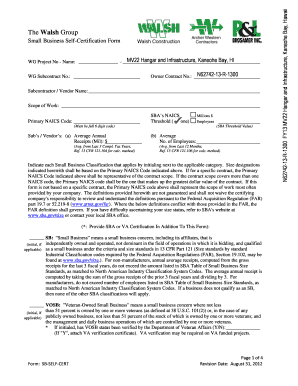
Filling out the Small Business Self-Certification Form is an essential step for small businesses looking to participate in contracting opportunities. This guide will provide you with comprehensive, step-by-step instructions to help you complete the form confidently and accurately.
Follow the steps to successfully complete the form online.
- Press the ‘Get Form’ button to access the Small Business Self-Certification Form and open it for editing.
- Enter the project name and WG project number in the designated fields at the top of the form.
- Fill in the subcontract number and owner contract number as required.
- Complete the subcontractor/vendor name and scope of work sections to accurately represent your business.
- Input your primary NAICS code. Ensure it is a complete six-digit code corresponding to your business's sector.
- Provide your average annual receipts from the last three completed tax years, ensuring it matches the SBA threshold for your NAICS code.
- Indicate the average number of employees your business has had in the past 12 months.
- Initial next to each applicable small business classification category that describes your business. Ensure understanding of definitions to accurately classify your business.
- For any classifications selected, confirm their status, and attach necessary verification documents if required.
- Complete the information furnished by section, providing the owner/principal's name, business name, type of business, address, phone, fax, and email.
- Sign and date the form to validate the information provided. Ensure that all information is accurate to avoid penalties.
- Once all fields are filled out and verified, you can save your changes, download a copy of the completed form, print it, or share it as needed.
Complete the Small Business Self-Certification Form online today to take the first step toward contracting opportunities.
Automatically Generate Invoice Number in Excel We need to use the help of a VBA application, as it can't be completed directly in Excel. Let us consider a new Excel workbook and then type the first invoice number. In our case, type 15600 in cell E2. The invoice number will start at 15600.
Industry-leading security and compliance
US Legal Forms protects your data by complying with industry-specific security standards.
-
In businnes since 199725+ years providing professional legal documents.
-
Accredited businessGuarantees that a business meets BBB accreditation standards in the US and Canada.
-
Secured by BraintreeValidated Level 1 PCI DSS compliant payment gateway that accepts most major credit and debit card brands from across the globe.