Loading
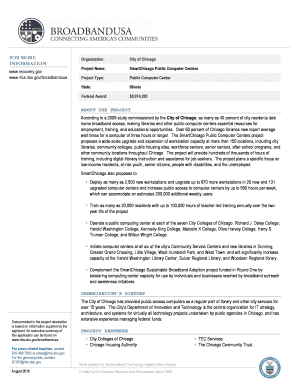
Get Printable Blank Fact File Template
How it works
-

Open form follow the instructions
-

Easily sign the form with your finger
-

Send filled & signed form or save
How to fill out the Printable Blank Fact File Template online
Filling out the Printable Blank Fact File Template online is a straightforward process that allows users to provide essential information efficiently. This guide will walk you through each section of the template, ensuring that you can complete it accurately and effectively.
Follow the steps to fill out the Printable Blank Fact File Template online.
- Click ‘Get Form’ button to access the Printable Blank Fact File Template and open it in your preferred online document editor.
- Begin with the 'Project Name' field. Here, enter the official name of your project. Ensure that it accurately reflects the nature of your work.
- In the 'Project Type' section, specify the category of your project. Choose the most appropriate descriptor to clarify its function.
- Fill in the 'State' field with the relevant state for your project. This helps to provide geographical context.
- In the 'Federal Award' section, include any applicable federal funding details. This might involve a brief description or relevant links.
- Provide a detailed explanation about the project in the 'ABOUT THE PROJECT' field. Highlight its purpose, target audience, and intended outcomes.
- For the 'ORGANIZATION’S HISTORY', give a concise background about your organization, focusing on its experience and qualifications.
- In the 'PROJECT PARTNERS' section, list any partner organizations involved in executing the project to showcase collaboration.
- Review the entire form for accuracy and completeness. Make necessary edits to ensure clarity and precision.
- Once you are satisfied with your entries, you can save the changes, download a copy for your records, print the filled form, or share it with relevant stakeholders.
Finish your documents online today and ensure they are all set for submission.
Productive formatting for a fact sheet: Single spaced with double space between headings and sections. Use fonts that contain easy to read characters. Use color, italics, bolded text to organize and highlight information remembering that more isn't always better. 1-2 pages in length.
Industry-leading security and compliance
US Legal Forms protects your data by complying with industry-specific security standards.
-
In businnes since 199725+ years providing professional legal documents.
-
Accredited businessGuarantees that a business meets BBB accreditation standards in the US and Canada.
-
Secured by BraintreeValidated Level 1 PCI DSS compliant payment gateway that accepts most major credit and debit card brands from across the globe.