Loading
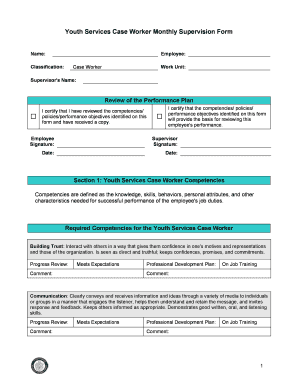
Get Supervision Forms (pdf) - Cps Hr Consulting
How it works
-

Open form follow the instructions
-

Easily sign the form with your finger
-

Send filled & signed form or save
How to fill out the Supervision Forms (PDF) - CPS HR Consulting online
Filling out the Supervision Forms is an essential process for effective evaluation and performance management in youth services roles. This guide provides clear instructions on how to navigate and complete these forms online.
Follow the steps to successfully complete the Supervision Forms.
- Click the ‘Get Form’ button to obtain the Supervision Form. This will allow you to access the document in a format that can be filled out electronically.
- Begin by entering the necessary personal information such as name, employee designation, classification, and work unit. Accuracy in this section is crucial as it identifies the individual being evaluated.
- Review the performance plan section. It includes certifying that the competencies and performance objectives listed have been understood and received. Both the employee and supervisor must provide their signatures and dates.
- Navigate to the competencies section. Fill out required competencies by providing ratings and comments based on performance expectations. Users should carefully consider the specific behaviors and skills specified.
- For optional competencies, choose at least two. Similar to the required competencies, provide ratings and comments to reflect the employee's performance.
- Complete the core duties section. Again, rate and comment to indicate how well the employee meets the expectations for their job role.
- In the overall development and career choices section, provide additional comments that summarize the performance review. This section allows for a more comprehensive evaluation.
- Once all fields have been filled out, ensure accuracy, and review the entire form for completeness. Save any changes made to the document.
- Finally, download, print, or share the completed Supervision Form, as required. Ensure that all necessary signatures are obtained where indicated.
Begin completing your Supervision Forms online to facilitate effective performance evaluations.
11 logo questions for designers to ask clients — What are your overall business goals? ... What do you want this logo to accomplish? ... Who is your target audience? ... What are your most successful marketing channels? ... How do you want your brand perceived? ... What are your brand values and mission?
Industry-leading security and compliance
US Legal Forms protects your data by complying with industry-specific security standards.
-
In businnes since 199725+ years providing professional legal documents.
-
Accredited businessGuarantees that a business meets BBB accreditation standards in the US and Canada.
-
Secured by BraintreeValidated Level 1 PCI DSS compliant payment gateway that accepts most major credit and debit card brands from across the globe.